The Productize
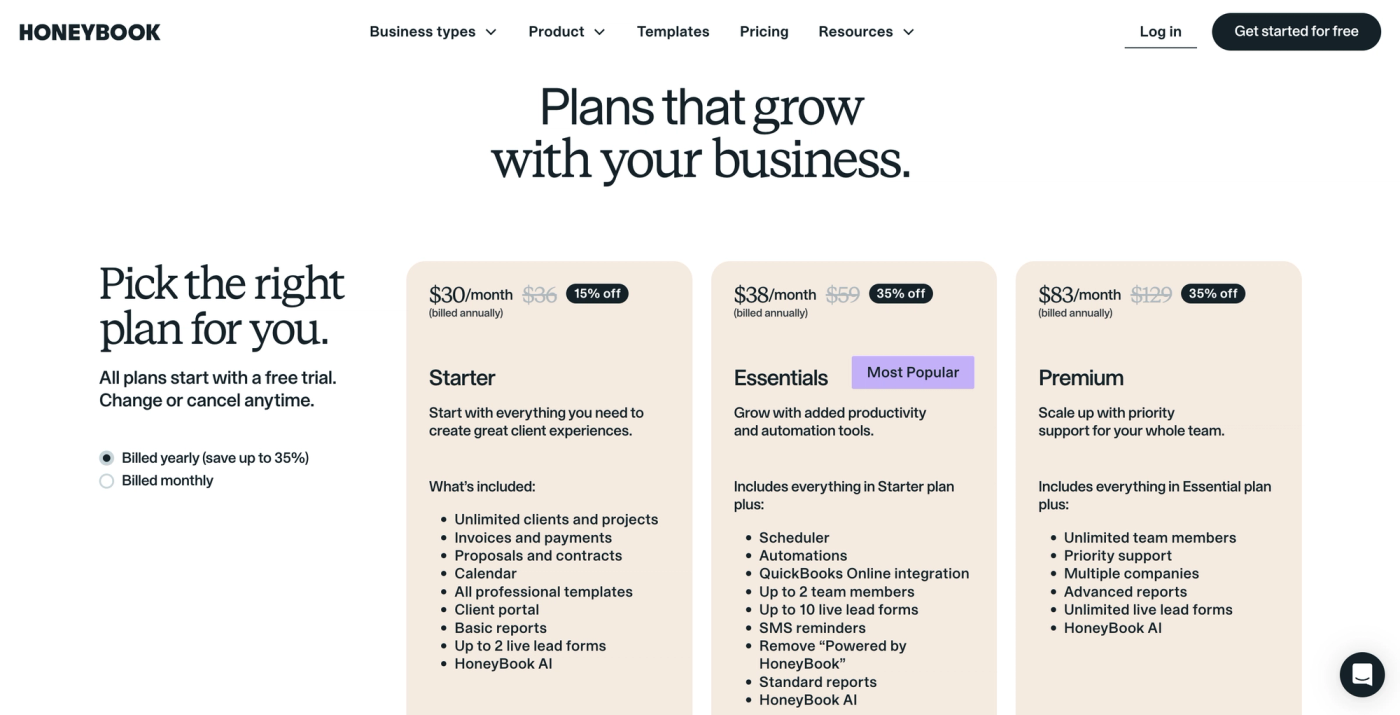
- HoneyBook's three plans cost $36, $59 and $129 a month billed monthly, or $29, $49 and $109 a month billed yearly.
- Online payments add 1.5% (ACH) to 3.4% + $0.09 (saved cards, Amex, Discover) on top of the subscription.
- Automations and team members start on Essentials. More than two team members needs Premium.
- For an agency collecting five $1,000 payments a month, fees can cost more than the plan itself.
- If clients send new work all month, check how HoneyBook handles delivery, not just booking and payment.
HoneyBook costs $36 to $129 a month billed monthly, or $29 to $109 a month billed yearly ($348 to $1,308 a year), as of November 2026. On top of that, every online client payment carries a processing fee of 1.5% to 3.4%, depending on how the client pays.
HoneyBook brings proposals, contracts and payments together, so clients can sign and pay without switching tools. Its value depends on which admin work it replaces for you, and which plan includes the features you need.
If you run a productized or subscription agency, look past the booking too. Your clients send new briefs and reshuffle priorities all month, so check whether HoneyBook can handle that, or whether you'd be paying for a second tool to run delivery.
HoneyBook pricing at a glance
HoneyBook has three plans, and all of them include unlimited clients and projects, proposals, contracts, invoices and a client portal. Higher plans add automations and more team members. Prices from honeybook.com, checked November 19, 2026.
| Plan | Billed monthly | Billed yearly | Team access | Key features and limits |
|---|---|---|---|---|
| Starter | $36/month | $29/month ($348/year) | Owner only | Basic reports, 2 live lead forms. No automations. |
| Essentials | $59/month | $49/month ($588/year) | Owner + up to 2 team members | Automations, scheduler, QuickBooks Online, 10 live lead forms, removes "Powered by HoneyBook" |
| Premium | $129/month | $109/month ($1,308/year) | Unlimited team members | Advanced reports, multiple companies, unlimited live lead forms, priority support |
Every plan starts with a 30-day free trial, no credit card required.
Which HoneyBook plan does your agency need?
The plan you need depends on two things: whether you want automations, and how many people need access.
Starter: solo booking and payments
Starter works when you handle client admin yourself and can follow up without automations. That means checking by hand whether a client opened your proposal, signed the contract or sent the feedback you need.
It includes unlimited clients and projects, so taking on more work won't force an upgrade. Adding a teammate will: that moves you to Essentials.
Essentials: repeatable admin with a small team
Essentials costs $59 a month and adds the scheduler, automations, QuickBooks Online and up to two team members. Clients can book calls in your open slots, a follow-up email goes out after an inquiry, and a contract goes out when a proposal is accepted.
Even if you work alone, automations mean Essentials. One Redditor liked HoneyBook but was weighing a cheaper plan, and the catch was losing the automations they'd come to rely on. Before you downgrade to save money, list the tasks you'd be doing by hand again.
Premium: a fourth person or several companies
Premium costs $129 a month, $70 more than Essentials. It gives you unlimited team members and lets you run several businesses from one login, each with its own projects, branding and payments. You also get reports on each client's total value and on what each teammate is working on.
HoneyBook processing fees: what they do to your margin
HoneyBook charges a fee on every online payment, on top of the subscription. When a client pays $1,000 with a card saved in HoneyBook, you receive $965.91 after a $34.09 fee. Fees from HoneyBook, checked November 19, 2026.
| Payment method | Fee per payment | Fee on $1,000 |
|---|---|---|
| Visa or Mastercard entered by the client | 2.9% + $0.25 | $29.25 |
| Saved card, including card autopay | 3.4% + $0.09 | $34.09 |
| American Express or Discover | 3.4% + $0.09 | $34.09 |
| ACH bank transfer | 1.5% | $15.00 |
| In-person Tap to Pay | from 2.7% + $0.10 | from $27.10 |
Tap to Pay is for in-person payments through the mobile app, not online retainers. Optional instant deposits add 1% to eligible card payments.
So if five clients each pay you $1,000 a month:
- By Visa or Mastercard, you pay $146.25 in fees.
- By saved card, you pay $170.45.
- By ACH, you pay $75.
You can take payments outside HoneyBook to avoid the fee, but then you're back to running a separate payment tool.
What HoneyBook costs for a team of 1, 3 or 10
For an agency collecting five $1,000 payments a month, HoneyBook costs $111 to $299 a month all in, depending on team size and how clients pay. The table uses the cheapest plan that fits each team size, owner included, billed monthly.
| People and plan | Subscription | Monthly total, saved cards | Monthly total, ACH | Yearly plan + 12 months of saved-card fees |
|---|---|---|---|---|
| 1 person, Starter | $36 | $206.45 | $111.00 | $2,393.40 |
| 3 people, Essentials | $59 | $229.45 | $134.00 | $2,633.40 |
| 10 people, Premium | $129 | $299.45 | $204.00 | $3,353.40 |
For a three-person team on Essentials, that's $229.45 a month if all five clients pay by saved card, or $134 if they pay by ACH. The subscription stays at $59. The difference comes entirely from how clients pay.
If you work alone but need automations, use the Essentials row, because Starter doesn't include them.
How to pay less for HoneyBook
Three things cut the bill:
- Pay yearly. It saves 15% to 20%: Essentials drops from $708 to $588 a year. You pay the full year upfront.
- Use the trial properly. The 30-day free trial covers nearly every feature, so set up a real proposal, contract and invoice before you pay.
- Push clients to ACH. At 1.5%, bank transfers cost less than half the fee of a saved card on the same invoice.
Is HoneyBook worth the cost for your agency?
HoneyBook earns its cost when it replaces the separate tools you use to book clients and get paid. A client can review a proposal, sign the contract, choose a payment option and finish booking in one smart file.
When HoneyBook earns its cost
Reviewers on G2 point to the same strengths:
- Fewer tools. Photographer Graeme R. found the templates easy to customize and liked bringing separate tools together. For a one-person business, the subscription covered most of his client admin.
- A consistent client experience. Alanna H., a founder working alone, said in her April 2026 review that templates and automations helped her deliver the same experience to every client with less effort.
- Knowing who owes you. Vanelle H., who works in client concierge and brand marketing, valued seeing which invoices were unpaid or unopened when she handled many at once.
Where you may still need another tool
Most of the complaints we found are about what happens after a client books.
- Recurring sessions. Tutoring business owner Jill H. praised onboarding but needed another paid scheduler for repeat appointments. HoneyBook's scheduler books single sessions, not recurring ones.
- Delivery. One agency owner on Reddit copied the purchased scope from HoneyBook into Dynalist after every signed contract, and used Toggl and Google Drive for the rest of the work.
- A client-facing queue. Clients can see their assigned tasks, but not an ordered queue of upcoming work they can rearrange themselves.
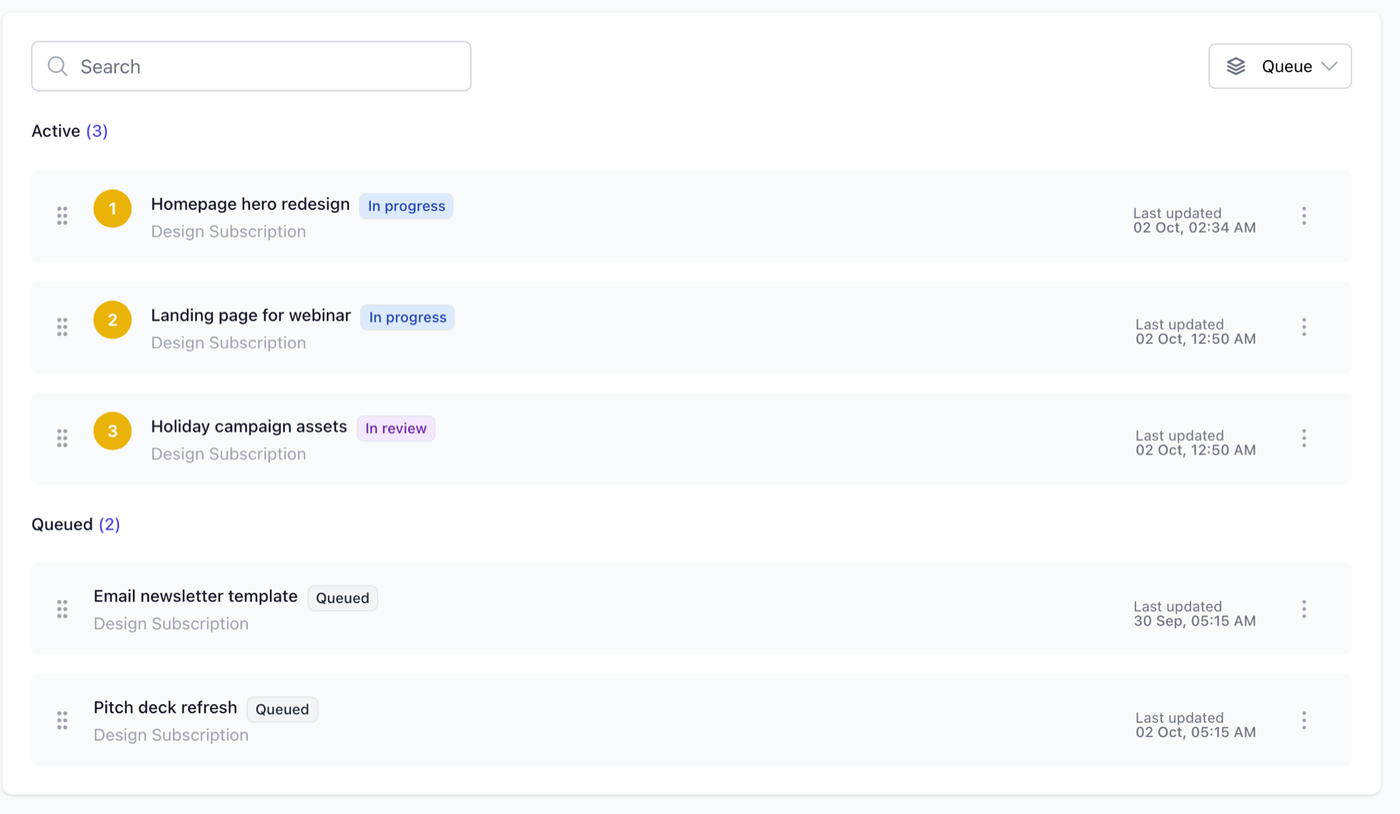
For a subscription agency, that last one is the big one. Say a design client submits five requests, but their plan covers three at a time. In ManyRequests, three requests stay active and the other two wait in the client's request queue. The client can move an urgent design to the top, and when an active request is done, the next one starts automatically.
How HoneyBook pricing compares with the alternatives
HoneyBook is the cheapest of these for a ten-person team on subscription alone, and Dubsado is cheaper still. The picture changes once you add payment fees and the delivery tools HoneyBook doesn't replace.
ManyRequests for productized and subscription agencies
ManyRequests is a client portal and service delivery platform for productized and subscription agencies. Clients buy your services, submit requests, track progress and reorder their queue in one branded portal, so your team always knows what to work on next.
- No extra payment fee. You connect your own Stripe account, and ManyRequests adds 0% on top. You pay Stripe's standard fees only (2.9% + $0.30 for US cards online).
- Billing tied to delivery. Sell subscriptions, hourly retainers or credit packs, and track time on each request with a timer or manual entries.
- Feedback on the work itself. Clients leave pinned comments on images and PDFs and timestamped comments on videos, and every version is saved.
- Pauses instead of cancellations. You can let clients pause their subscription when they have no work for you, so they take a break instead of leaving.
To test it, use the 14-day free trial (no credit card) to set up one recurring service and see how a client submits and reorders requests. Start a free trial.
Other HoneyBook alternatives
- Bonsai combines contracts and invoicing with project management and time tracking. See Bonsai vs HoneyBook.
- Dubsado offers client forms, contracts and invoices with automated workflows on its Premier plan. See HoneyBook vs Dubsado.
- For bookkeeping, see HoneyBook vs QuickBooks, or browse our HoneyBook alternatives guide for a longer shortlist.
What a ten-person team pays
Monthly prices for ten people including the owner, billed monthly. Payment fees are extra.
| Plan | Monthly cost for 10 people | What drives the cost |
|---|---|---|
| Dubsado Premier | $80 | $55 plan + $25 for the 4 to 10 user tier |
| ManyRequests Core | $119 | $39 plan with 2 seats + 8 seats × $10 |
| HoneyBook Premium | $129 | Unlimited team members included |
| ManyRequests Pro | $169 | $99 plan with 5 seats + 5 seats × $14 |
| Bonsai Essentials | $250 | 10 seats × $25 |
Dubsado is the cheapest here. ManyRequests Core costs $10 less a month than HoneyBook Premium for the same ten people, and Pro adds workload planning for $40 more. ManyRequests also adds no processing fee on top of Stripe's, so the gap grows with every client payment.
If HoneyBook already covers your needs, switching may not be worth it. If you also pay for a separate tool to manage client requests and feedback, compare the full bill. Our ManyRequests vs HoneyBook comparison covers the workflow differences, and ManyRequests pricing shows what each plan includes. Moving over is free: our team migrates your clients and subscriptions for you.
Is HoneyBook the right investment for your agency?
HoneyBook is good value if you mainly need to send proposals, get contracts signed, collect payments and follow up with clients. Choose the plan that covers those tasks, then add processing fees when you estimate what you'll spend, and what you charge.
If clients send new work all month, also plan how you'll organize it after they pay. In ManyRequests, clients submit briefs, see the status of every request and reorder their queue. Try ManyRequests free for 14 days and take one request from submission through revisions to completion before you decide.
FAQ
How much does HoneyBook cost per month?
HoneyBook costs $36, $59 or $129 a month billed monthly for Starter, Essentials and Premium, or $29, $49 or $109 a month billed yearly. Online payment fees of 1.5% to 3.4% come on top.
Does HoneyBook charge transaction fees?
Yes. Online payments cost 2.9% + $0.25 when the client enters a Visa or Mastercard, 3.4% + $0.09 for saved cards, autopay, Amex and Discover, and 1.5% for ACH bank transfers. The fee comes out of each payment you receive.
Does HoneyBook have a free trial or a free plan?
HoneyBook has a 30-day free trial with no credit card required, but no free plan. After the trial you pick Starter, Essentials or Premium.
Is ManyRequests cheaper than HoneyBook?
For a solo owner, not quite: HoneyBook Starter costs $36 a month and ManyRequests Core $39, though Core includes two seats. For teams, yes: three people cost $49 a month on ManyRequests Core versus $59 on HoneyBook Essentials, and ten people cost $119 versus $129 on HoneyBook Premium. ManyRequests adds no processing fee on top of Stripe's.
What is the best HoneyBook alternative for agencies?
It depends on the work you deliver. For ongoing design or content services, ManyRequests fits best: clients submit briefs, follow requests and reorder their queue, and you can limit how many requests are active at once. For contracts and onboarding on a small budget, look at Dubsado.
Is there a free alternative to HoneyBook?
Zoho Invoice is free for up to two users and 500 invoices a year, with payment reminders and recurring invoices. It covers invoicing only, not proposals, contracts or a client portal, and payment fees still apply.