Smartsheet vs Wrike: Which is Better for Productized Agencies? [2026 Guide]
Smartsheet vs Wrike explained for subscription agencies. See which handles unlimited requests, retainers, and growth better.

William Nzewi

Picking the right tool is crucial, especially for a productized agency.
You deal with client requests which change suddenly, tight deadlines, team members who need quick feedback and ops leads who track everything to keep the business profitable.
By the end of this guide, you'll be clear on Smartsheet vs. Wrike for agencies.
But first, some background info…
Smartsheet feels like a super-powered spreadsheet. It started as a way to make Excel better for teams: grids, formulas, automations and views like Gantt or calendar.
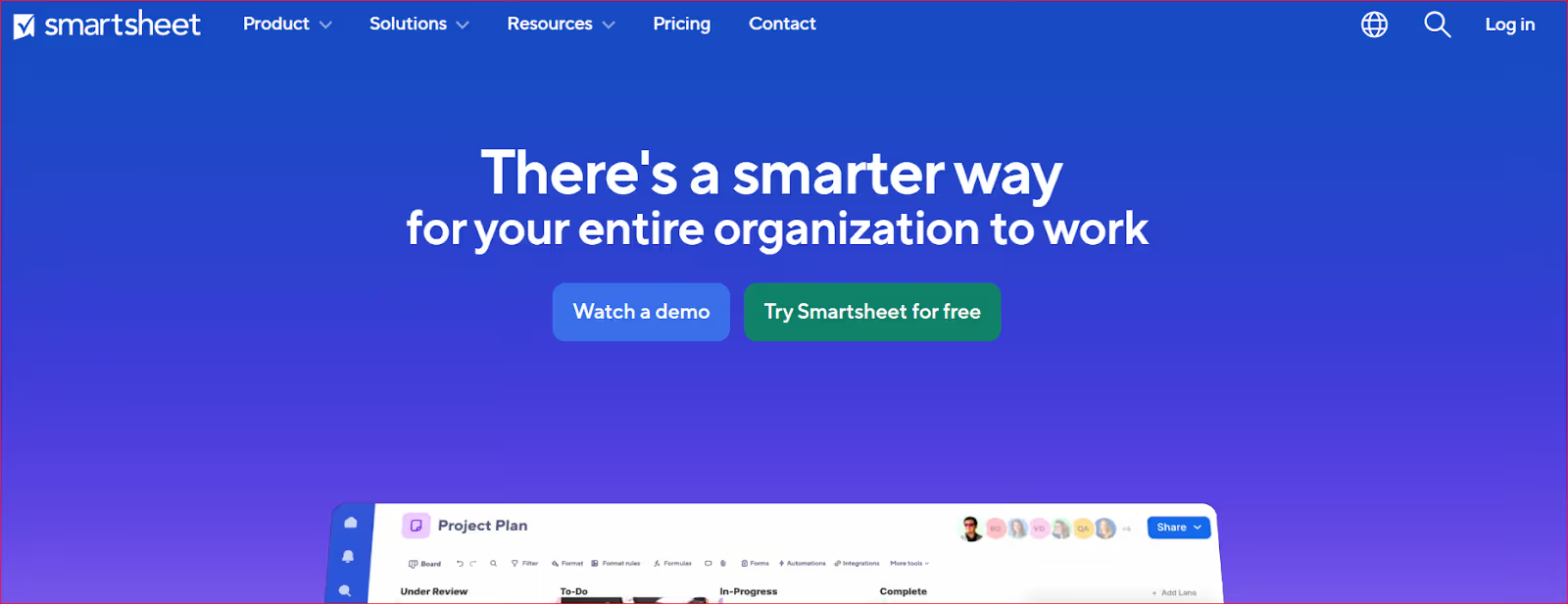
Many agencies pick it because their team already knows spreadsheets.
You can:
Wrike is built around tasks and structure. It has folders, projects, boards, timelines, proofing tools and strong automations.
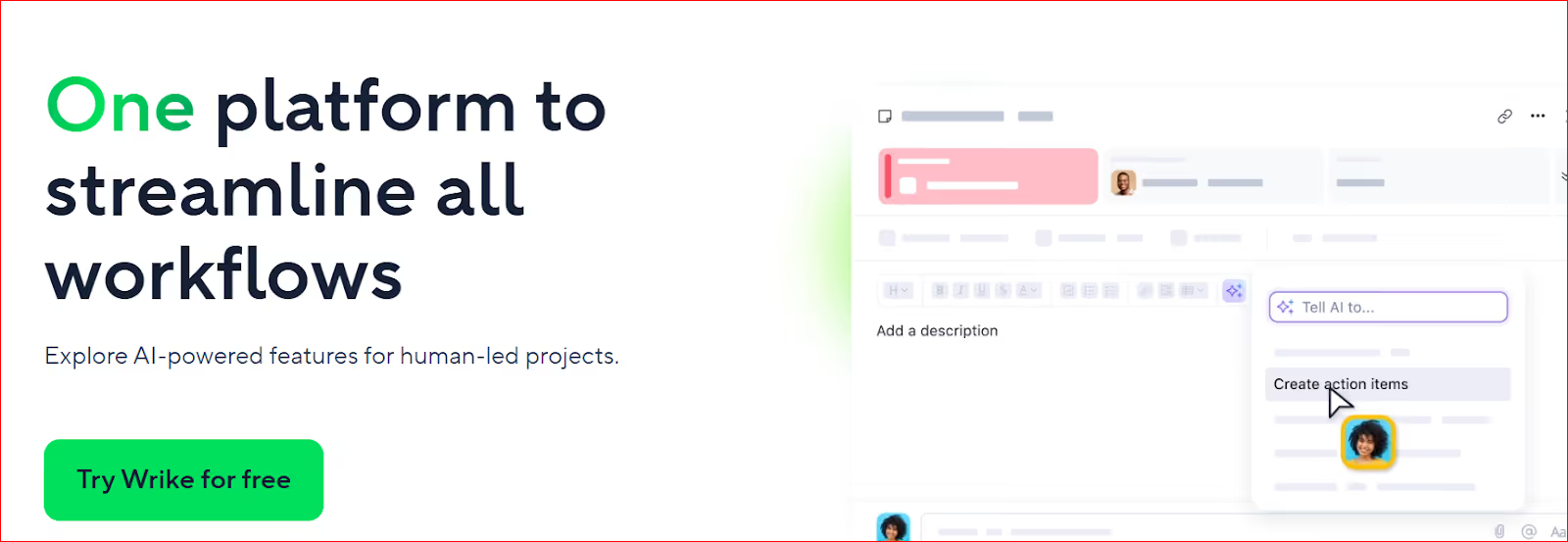
Agencies use it for creative flows:
across team members.
In the sections ahead, we'll look at Smartsheet vs Wrike through the eyes of founders, operations leads and client-facing managers. The focus is on real agency workflows:
For productized services, speed matters most at the start of work.
A new client signs. They expect action immediately. Not next week after the team finishes “setting up the system.”
Some tools let you start work in minutes. Others need preparation before work can begin.
Smartsheet and Wrike handle this very differently.
In Smartsheet, work begins with a sheet.
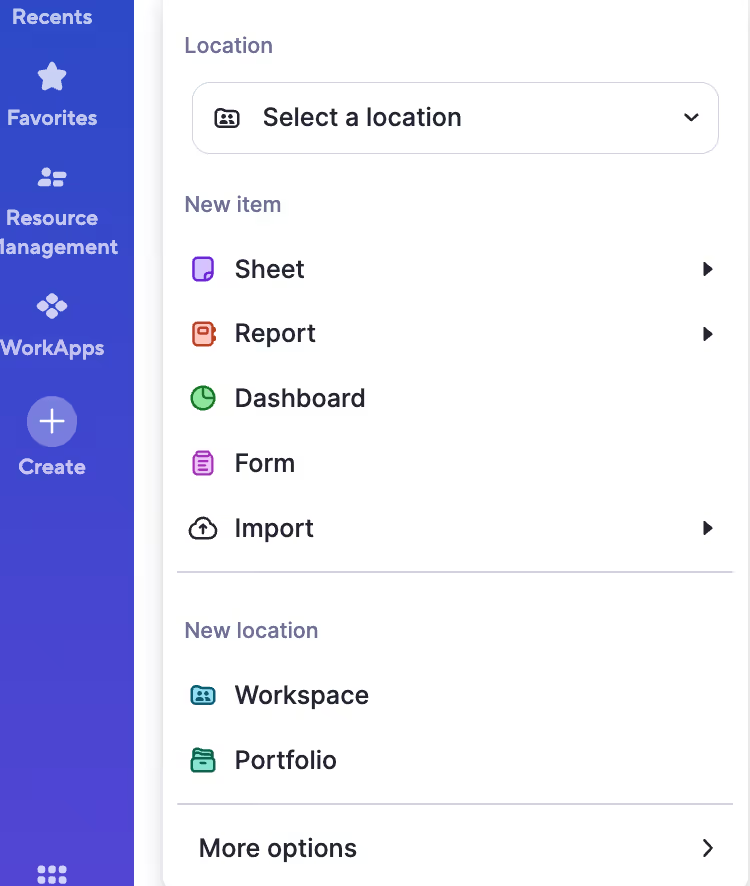
Courtesy: smartsheet.com
Before the team touches the project, someone (usually an operations lead) creates structure:
The good news: once done, it’s clear.
The bad news: it takes effort every time a new service or client type appears.
Productized businesses rarely run identical projects. Even retainers change quickly.
In essence, Smartsheet doesn't really like changes, especially ones that are sudden.
New website client:
Operations builds the project structure → assigns owners → updates dates → shares access.
New marketing retainer:
Duplicate previous sheet → clean it → re-plan timelines → notify team.
So in Smartsheet, you don’t launch work instantly. You have to prepare first.
Businesses with strong operations teams may like the “organized” set up. But fast-moving teams will struggle.
Wrike practically does the opposite.
Instead of building out a full project plan first, you create a space or folder and begin adding tasks. Work can begin immediately.
Then structure grows around it:
You don’t need a perfect plan to start.
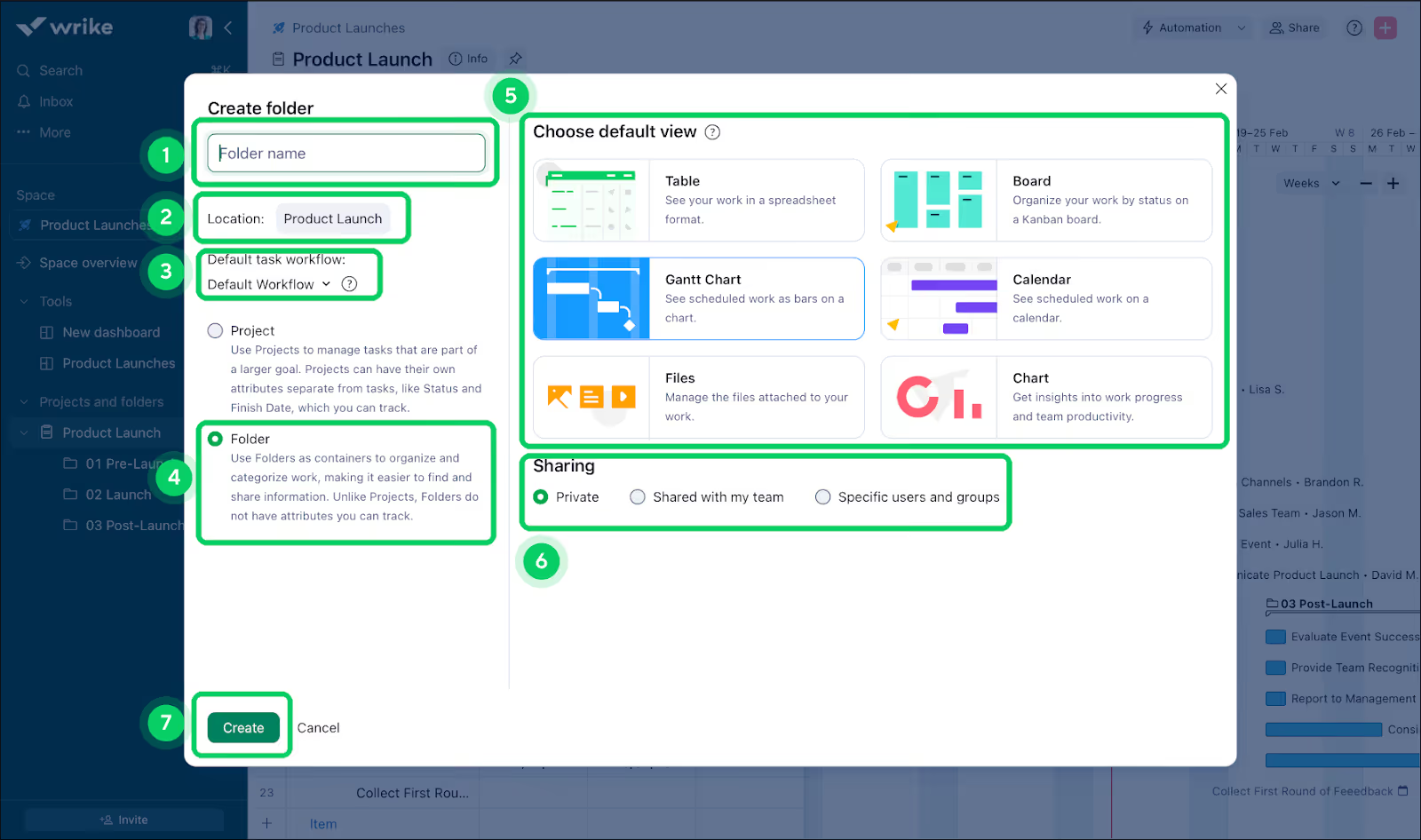
Courtesy: wrike.com
For fast-paced productized agencies, this is music to their ears. A client asks for something → task created → work begins
But over time, lack of structure causes confusion. So teams invest time building templates and workflows.
New website client:
Create a project → create tasks → assign team → refine workflow later.
New marketing retainer:
Use blueprint → tasks appear → adjust based on client needs.
You can launch immediately.
But maintaining order requires ongoing effort.
As a productized business, you onboard clients, not just set up projects.
And during onboarding, speed matters.
You need to:
In Smartsheet, you prepare the project before action. In Wrike, you act first and organize alongside it.
Neither is wrong, but they create different operational habits.
Let's say you're launching a campaign this week…
Smartsheet: plan → confirm → execute
Wrike: create → execute → organize
Handling ongoing retainers
Smartsheet: maintain structured schedule
Wrike: manage continuous activity
Handling sudden client requests
Smartsheet: add to plan
Wrike: add to workflow
So the question becomes:
Do you want your team to prepare work before starting, or structure work while doing it?
As we've seen, Smartsheet favors preparation. Wrike favors speed.
If you value predictability, you'll lean toward Smartsheet. For speed, though, Wrike is better.
But both still require teams to translate client communication into projects manually. And this is where setup time quietly grows and destroys efficiency.
Consider this scenario…
Your designer waits for feedback in email. Your account manager replies in Slack. Your client comments on the file in Google Drive. Then someone updates the project tool later. And suddenly, work breaks down, driving you nuts.
Why did work break down? Because the task was unclear? I don't think so.
It stopped because the conversation was all over the place.
Most project management tools struggle with this,including Smartsheet and Wrike.
They manage work well inside the team.
But client-facing businesses also need to manage conversations (with clients) outside the team.
Smartsheet allows you to share sheets with clients. They can view progress, add comments and sometimes edit fields depending on permissions.
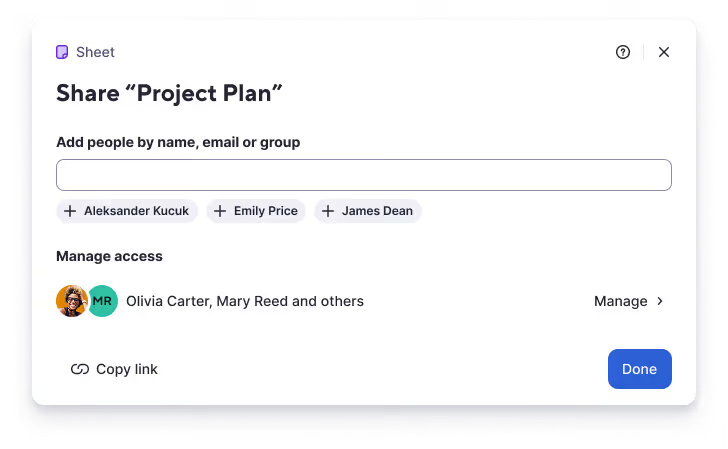
Courtesy: smartsheet.com
Now, would you call this collaboration? For me, it feels like giving clients access to an internal document.
Again, clients don’t think in rows and columns. They just want answers to their questions:
In Smartsheet, they must understand the sheet first:
So what do most clients do?
They simply avoid using the tool and turn to good ol’ email or WhatsApp instead.
Now your team has to copy feedback into Smartsheet manually to keep records accurate.
In effect, the sheet becomes a record of communication, not the place communication happens.
Wrike improves this experience. Clients can be invited as external users. They can comment directly on tasks, review files and approve work.
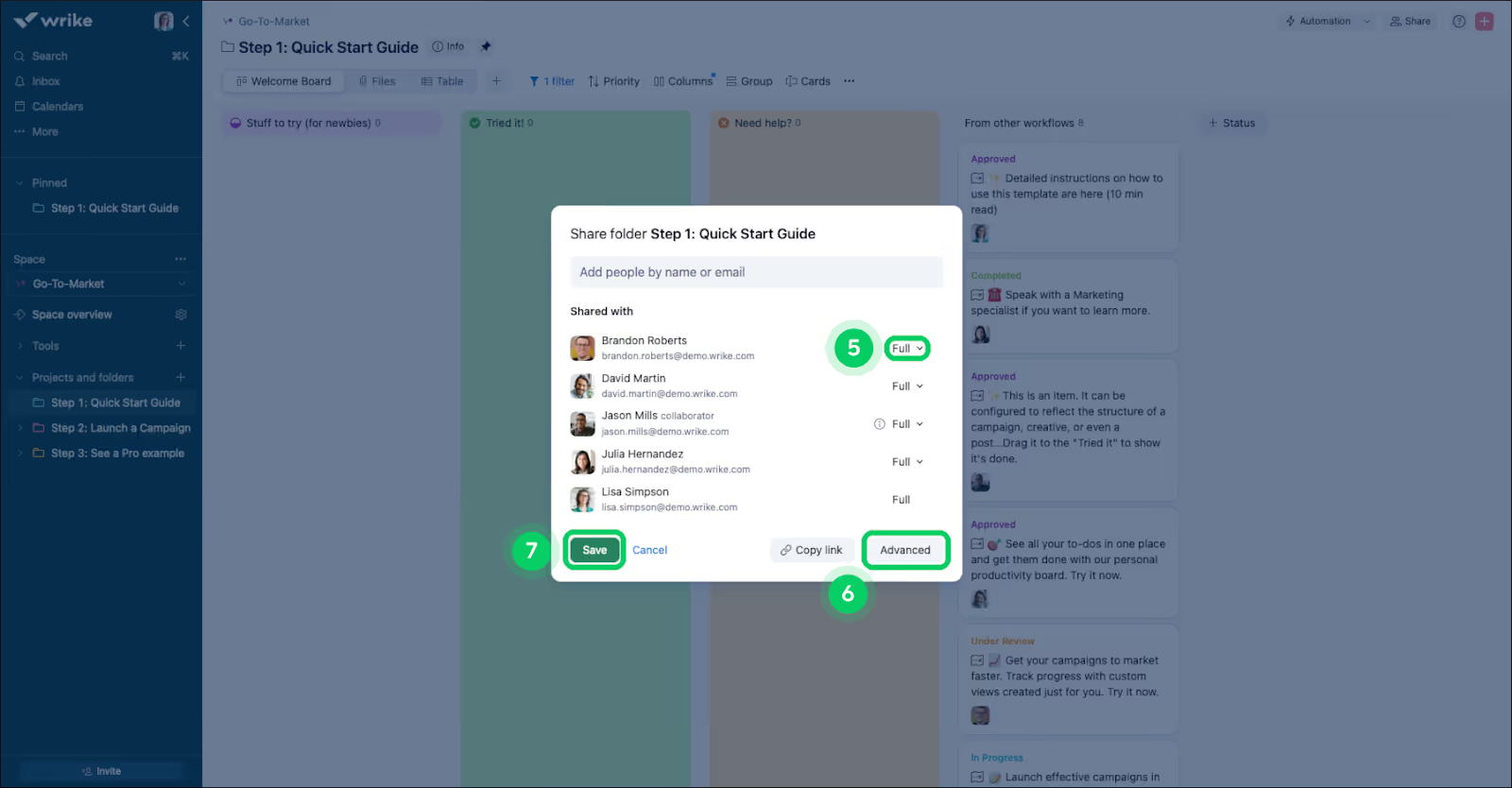
Courtesy: wrike.com
Compared to Smartsheet, this feels closer to real collaboration.
Feedback lives next door to the work. Approvals can happen inside the tool. The team doesn’t need to translate messages as often.
But there’s still friction.
Wrike is a workspace built for teams who use it daily.
Clients? They don't.
So they must:
The truth? 90 percent of them won’t.
They work with many vendors. They won’t learn a new workflow for each one.
So they do what they're already comfortable with: use email or WhatsApp, even for urgent messages.
The team now has to monitor multiple channels to keep work moving, practically becoming translators:
This invisible work grows with every client.
A good collaboration system should:
When communication lives outside the project system, delays multiply:
Not good for a productized business.
Neither Smartsheet nor Wrike excels at client communication.
Productized services thrive on daily execution:
A good project tool should help your team move faster.
Smartsheet and Wrike handle daily work very differently.
In Smartsheet, a task is a row in a sheet.
Each row holds information:
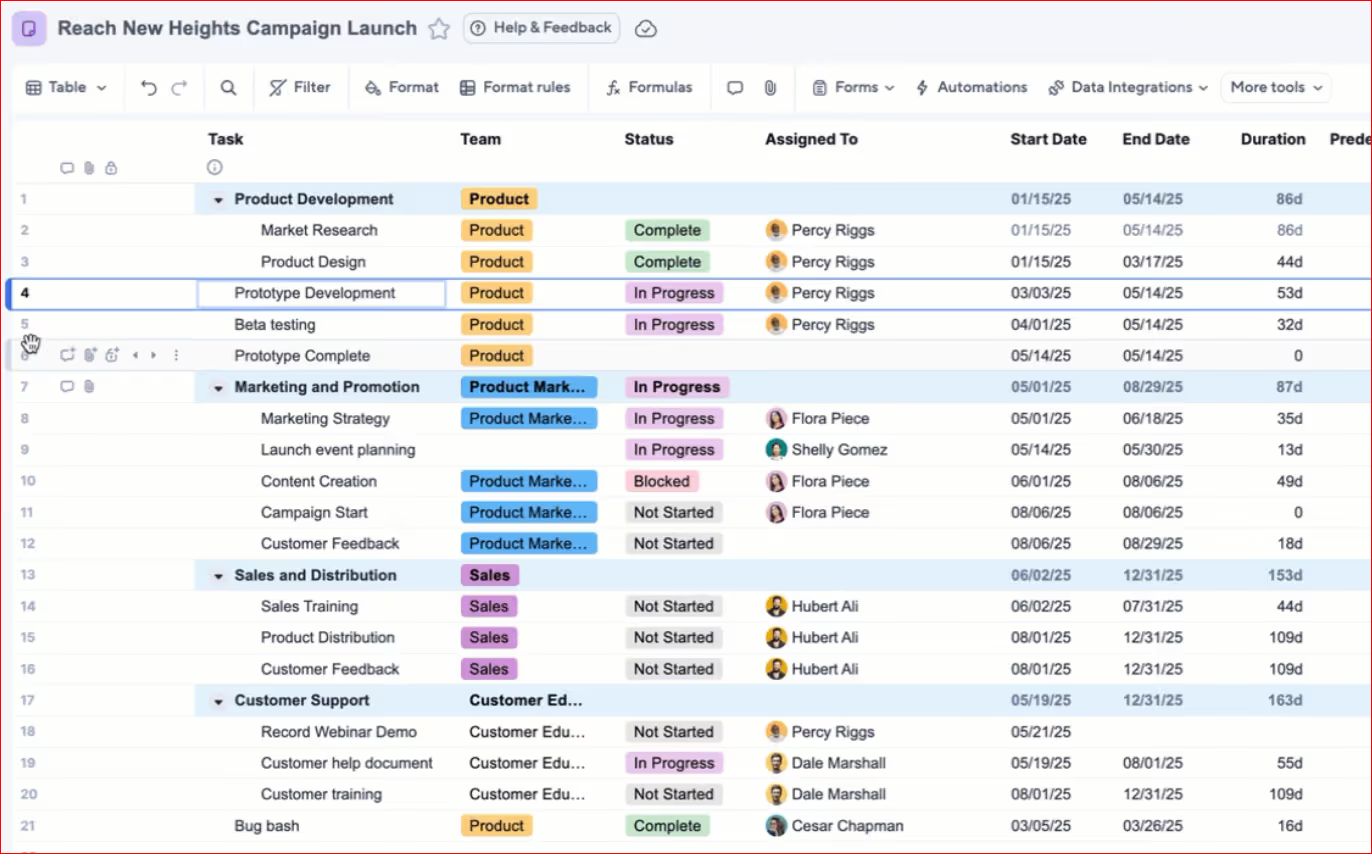
Courtesy: smartsheet.com
This works well when tasks move in a clear order. You can scan the sheet and understand the plan quickly.
But daily execution (for agencies) is interaction, not scanning.
Team members don’t just check status and call it a day. They discuss details and adjust direction.
Because Smartsheet is row-based, conversations hardly happen within the work. Yes, comments exist, but the workflow still feels like updating a record.
So what do people do?
Communicate in Slack, WhatsApp or email → finish work → update the row.
Smartsheet tells you what should be happening. But it doesn't really guide your actions moment by moment.
Let me explain…
A designer opening the sheet sees many rows.
They must filter mentally:
Unless carefully maintained, you'll lose sight of priorities (what really matters).
Why?
Because the conversations (driving your operations) happen somewhere else, usually in chats.
So the sheet tracks tasks, while your team manages execution elsewhere.
Wrike treats each task as an active workspace.
Inside a task you can:
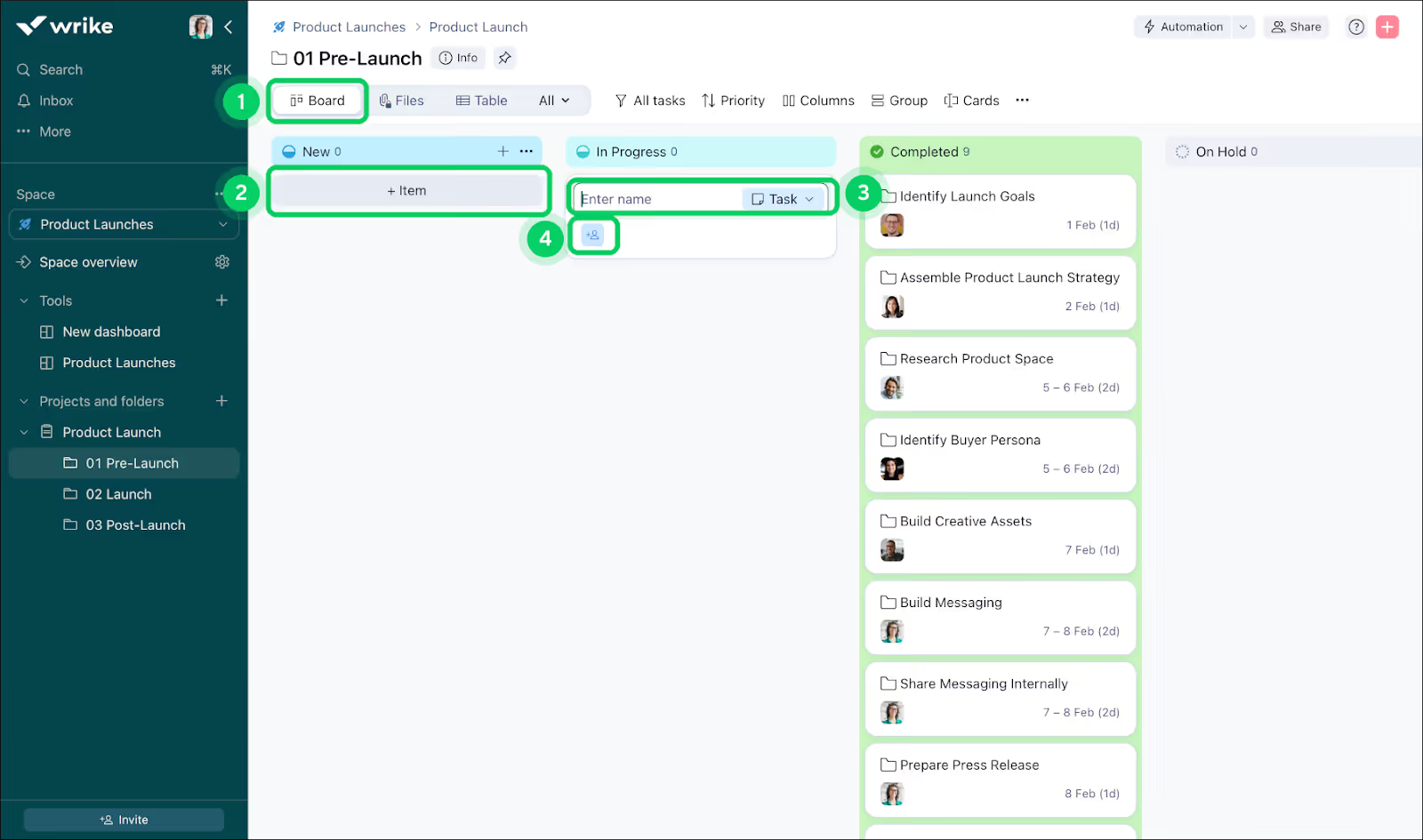
Courtesy: wrike.com
Unlike Smartsheet, work happens directly inside the system. And instead of updating after finishing, the team works while inside the task.
This reduces context switching. A writer reads feedback where the brief lives. A designer uploads revisions where the request exists.
The result?
Cleaner, clearer execution: open task → see discussion → act
This comes at a price, though.
Wrike improves daily clarity but adds structure.
Statuses, workflows, folders and subtasks keep work organized. But they must be maintained.
Teams must actively manage the system so the system can guide work.
So Wrike helps execution more than Smartsheet, but it demands discipline to stay clean.
For productized agencies, work rarely ends after one pass.
Instead, you:
Create → review → revise → approve → reopen → revise again
How do both tools behave?
Smartsheet revisions often appear as status changes or comments. The context may spread across updates, making it harder to see the full history at a glance.
Wrike revisions stay attached to the task. Conversations remain visible. The team works inside one thread.
So Wrike handles iteration better and Smartsheet does tracking better.
Daily execution in productized services is mostly reactive:
The best system reduces thinking overhead: open → understand → act
Smartsheet shows the project clearly but doesn’t always guide the next action. Wrike guides action but requires ongoing care to stay simple.
Where are we? What’s done? What’s delayed? What are we waiting on?
A project tool should answer these questions without the team preparing a report every week.
Smartsheet is excellent at structured visibility. Because everything lives in rows and fields, the system can easily turn project data into dashboards:
Leadership and stakeholders understand it quickly. It looks clean and organized.
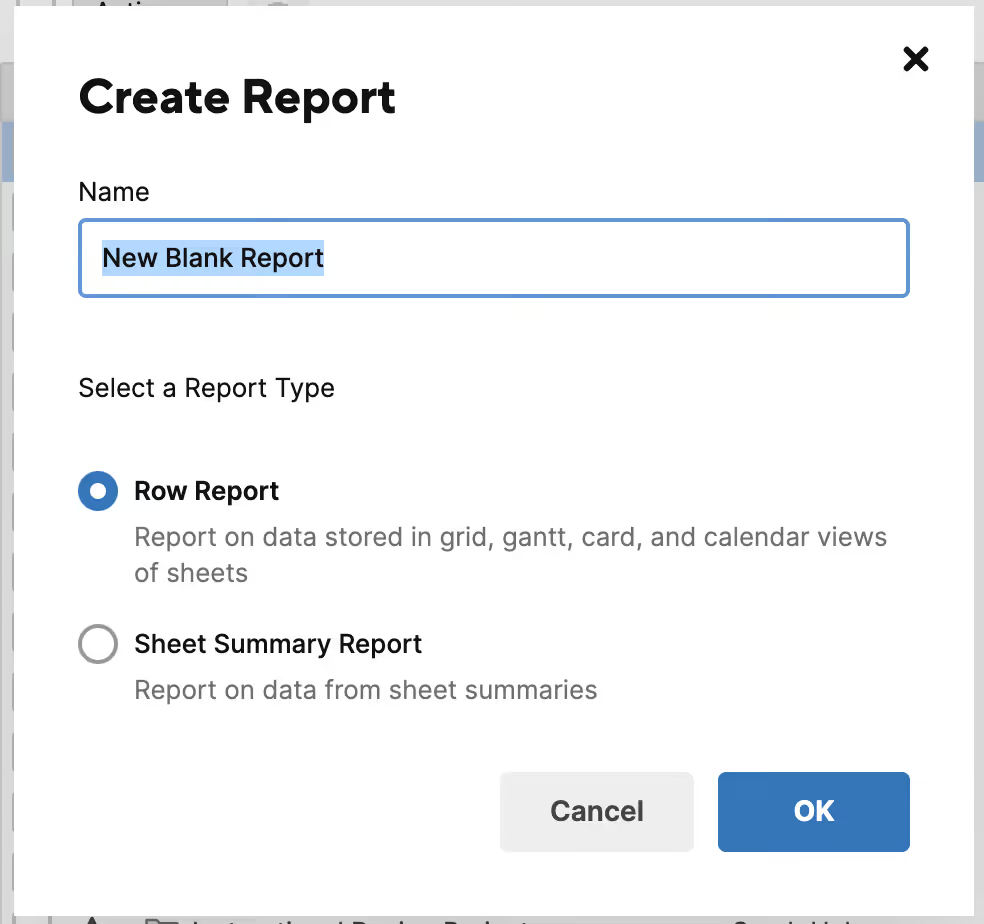
Courtesy: smartsheet.com
For productized agencies, this works well when sending updates to clients who want a high-level view:
Smartsheet shines as a reporting layer.
But there’s a catch.
Reports are only as accurate as the sheet. If the team delays updating rows, the dashboard shows outdated information. So teams often update Smartsheet before meetings just to keep reports correct.
Wrike focuses less on presentation and more on live operational visibility.
Managers can see:
It answers internal questions quickly:
Because work happens inside tasks, the data updates automatically as the team works. This reduces manual reporting effort internally.
But as you know, client reporting is different.
Wrike’s views make sense to teams who understand workflows. Clients may find them too detailed or technical. They don’t always want to see task trees or internal statuses. Simple progress answers are all they ask for 99.99 percent of the time.
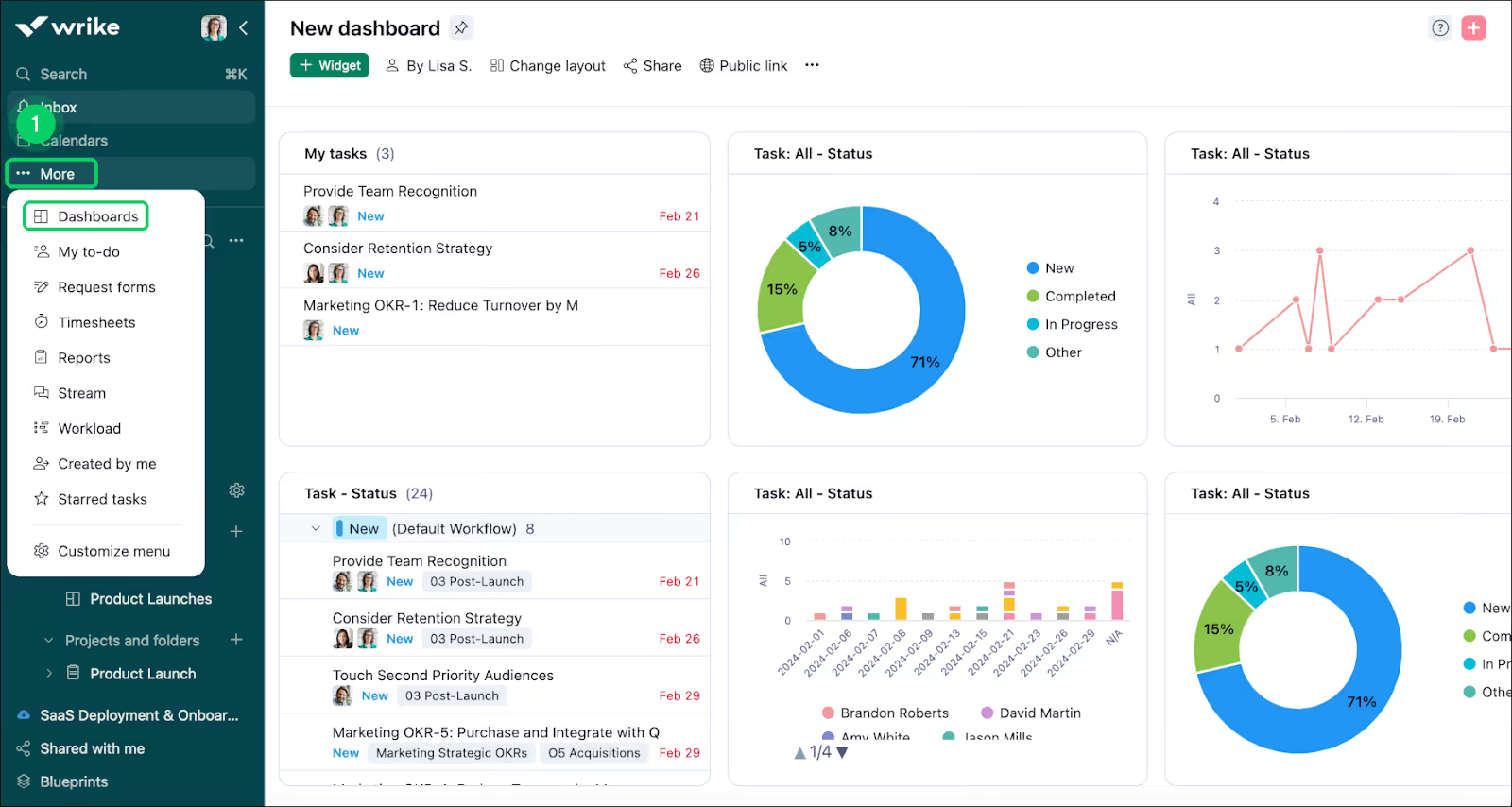
Courtesy: wrike.com
So teams still summarize updates manually when speaking to clients.
This is the key difference.
Smartsheet communicates outward well. Wrike does better with inward discussions.
Smartsheet gives a clean presentation but depends on manual upkeep. Wrike gives live operational awareness but not always client-friendly updates.
As an agency, you need:
Neither tool naturally balances both without effort.
Most teams run weekly or bi-weekly client updates.
Here’s what happens in practice:
With Smartsheet The manager checks the sheet → adjusts statuses → shares dashboard → explains details.
With Wrike The manager reviews tasks → interprets progress → writes summary → sends updates.
So Smartsheet is stronger for presenting progress. Wrike is better for monitoring progress.
Both require human translation.
The ideal system would let clients understand progress without a meeting. But in both tools, updates often depend on an account manager acting as interpreter.
Repetition is commonplace in this line of work. Just can't run away from it:
So teams look to automation to save time.
When done right:
But automation has a hidden side. It's called maintenance. A system that saves time at first can later demand constant attention.
This is where Smartsheet and Wrike feel very different over time.
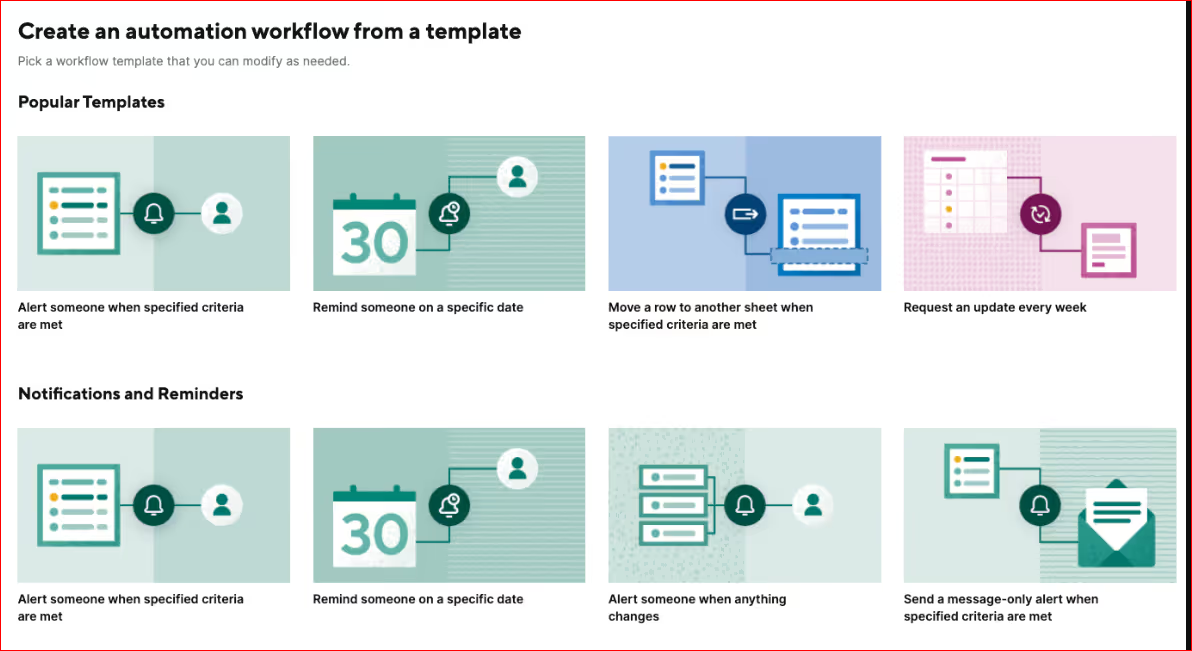
Courtesy: smartsheet.com
Smartsheet automations act like rules on top of a plan.
You can create triggers such as:
It fits naturally because Smartsheet is already structured. You defined the process in the sheet, so automation follows the same logic.
For predictable workflows, this works well:
Once set, it quietly runs in the background. But things rarely stay predictable in this field.
When services evolve, new approval steps appear. With new deliverables, rules must be updated manually.
Over time, sheets collect many small automations built at different times by different people.
Eventually someone asks:
The automation saves time daily but requires periodic cleanup. The more customized the process, the more maintenance needed.
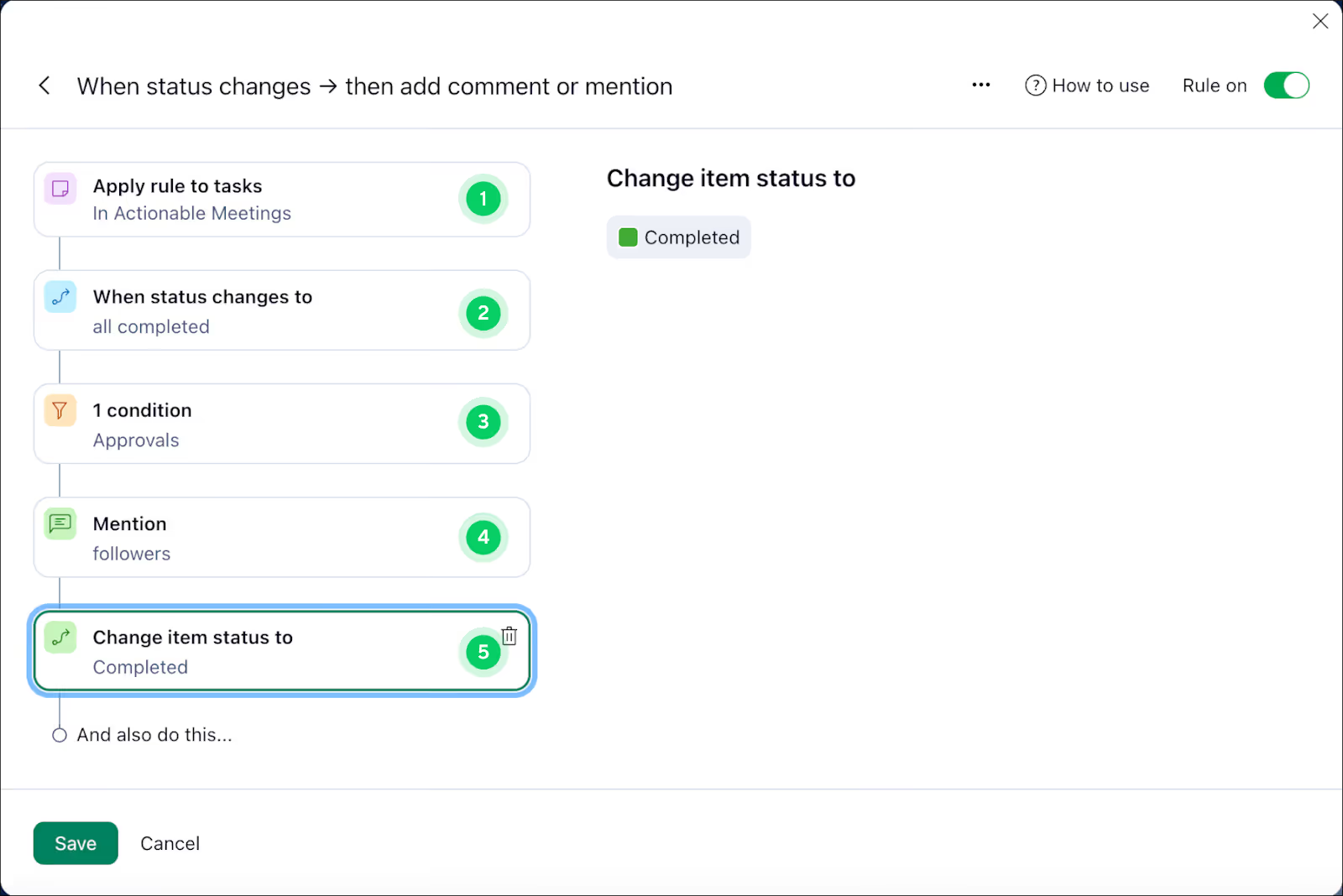
Courtesy: wrike.com
Wrike approaches automation through workflows and statuses. Instead of rules sitting beside work, automation lives inside the lifecycle of a task:
This feels powerful because the system drives execution directly. A task moves forward and the next action appears.
For teams running complex production, this is helpful.
But complexity builds quickly.
Each workflow adds:
Soon the system needs clear governance. Someone must design and maintain the structure so it doesn’t break.
If not managed carefully, teams resort to workarounds:
Overheads appear faster in Wrike than in Smartsheet.
So after a few months, many teams quietly assign a role (someone who understands the tool) to:
Many productized businesses don’t charge per project anymore. They sell access instead.
The client pays a flat monthly fee and can submit as many requests as they want.
The agency works through them one by one, or in small batches.
This is the unlimited request model.
It is predictable for the client and stable for the business. That's if the workflow supports it.
The unlimited model solves two classic problems:
Pricing friction
Clients stop asking “how much for this small change?”
Sales bottlenecks
Instead of selling projects repeatedly, you sell a subscription once.
In project work, you:
In unlimited work:
This requires:
Else, there'll be trouble.
Smartsheet expects defined scope.
You create a sheet → define tasks → assign dates → track progress.
But unlimited services don’t have fixed scope, as new requests appear constantly.
So teams try to force requests into rows:
And after a while, finding active work begins to feel like looking for a needle in a haystack. Harder than doing the actual work.
Wrike handles ongoing tasks better, but still assumes structured projects.
Agencies create:
At first this works. Then volume increases.
Now you're dealing with:
Wrike becomes one big task storage system. Then the team spends time organizing work instead of processing work.
The unlimited model runs on a fast, visible but simple loop:
Traditional tools just can't handle this.
Now let's talk about the lifeblood of productized services.
A retainer is more than a repeating invoice. It is a working relationship which renews periodically.
Each month the client expects:
This points to one thing: predictable revenue.
But predictable revenue only works if billing matches how the service is delivered.
Else, the client starts asking:
“What exactly did we pay for this month?”
This can lead to two things:
Most project management tools struggle with this.
Smartsheet does not manage subscriptions.
You can track a monthly project cycle:
But billing still happens outside the tool.
So every month looks like this:
And if the client questions it, someone manually checks the sheet.
This works for a few clients but breaks at scale. Because the system tracks projects, not service continuity.
Wrike handles repeating tasks better.
You can create recurring workflows:
But billing is still separate.
Although work repeats, invoices don’t connect to it.
The process becomes:
The agency still has to “translate” work into billing. That translation is where mistakes happen:
Retainers fail when scope cannot be tracked.
If a client submits 5 or 40 requests, the invoice often stays the same. So the business quietly absorbs extra work.
Why?
Because the system doesn’t connect: client requests → completed work → monthly value
That means you notice scope creep too late.
Recurring billing should answer three questions automatically:
If billing cannot answer these instantly, someone has to investigate every month.
In a service-centric workflow, the retainer becomes simple.
Each month:
So recurring billing only works smoothly when billing follows client requests and completed work
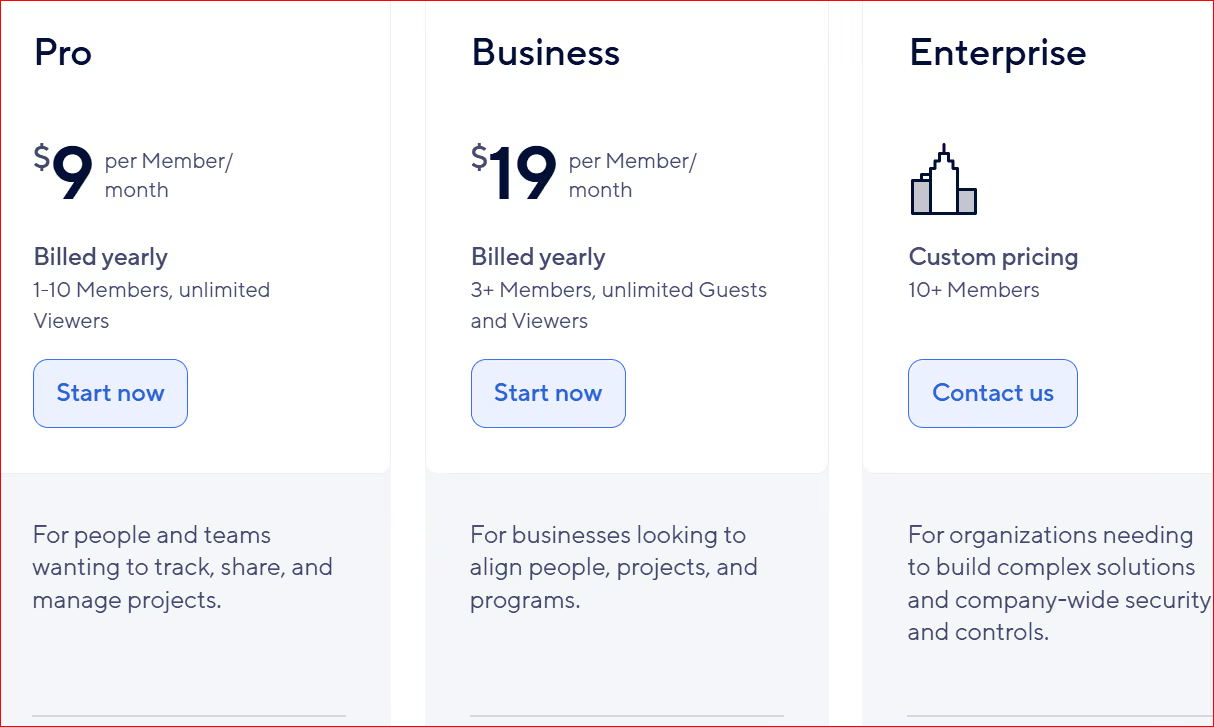
Smartsheet has three main paid plans: Pro, Business, and Enterprise. No free plan. You get a 30-day trial instead.
Pro: Starts at $9 per user per month (billed annually) or $12 monthly. Good for small teams (1-10 members) with unlimited viewers.
Includes basic views, formulas and 250 automations per month.
Business: $19 per user per month (billed annually) or around $24 monthly. Needs at least 3 members. Adds unlimited guests/viewers, timeline views, workload tracking and unlimited automations.
Enterprise: Custom pricing, often for larger setups with AI tools, unlimited storage and admin controls.
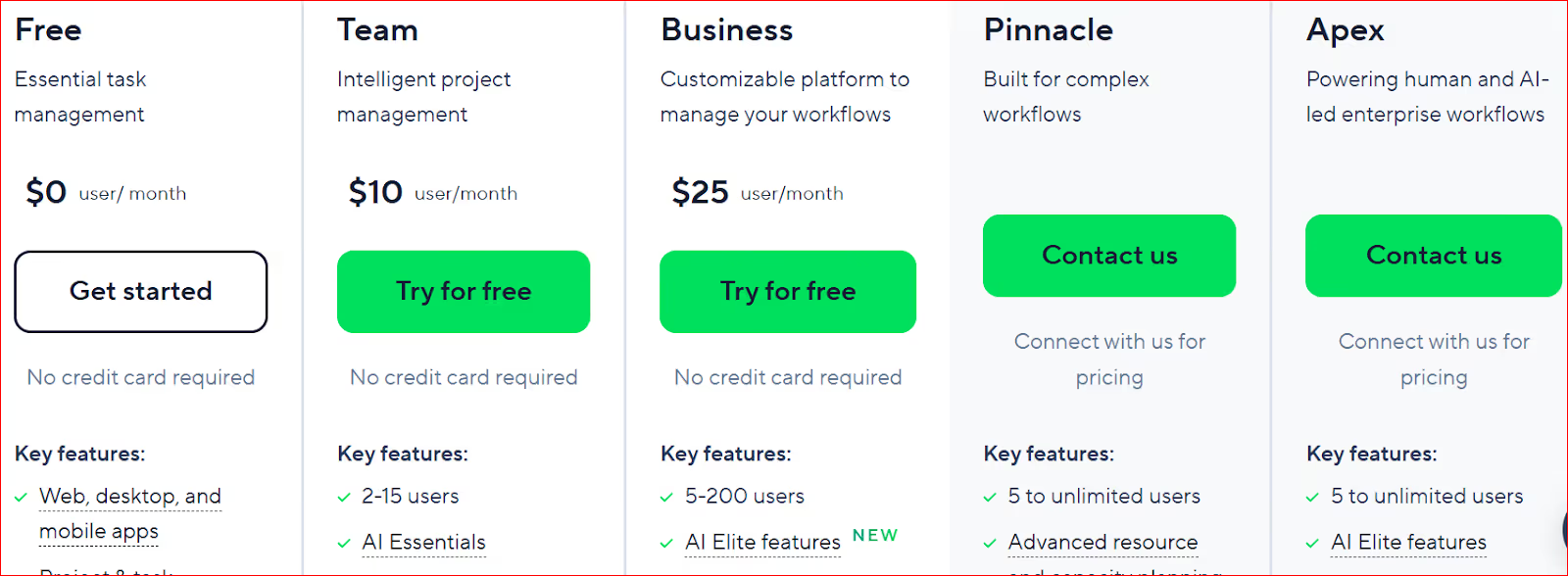
Wrike offers Free, Team, Business, Pinnacle and Apex plans.
Free works for basics with unlimited users (but limited features and 2GB storage).
Team: $10 per user per month (billed annually). For 2-15 users. Adds better views, integrations and AI basics.
Business: $25 per user per month (billed annually). Starts at 5 users minimum. Brings advanced reporting, custom workflows, resource management and more storage (5GB per user).
Higher tiers (Pinnacle/Apex): Custom, for big teams with heavy needs.
Productized businesses don’t scale like internal teams.
Apart from asking, “Can we afford this today?”
You’re also asking, “What happens when we double our clients?”
Smartsheet and Wrike handle growth differently, and the real cost is not only the subscription.
Here is where agencies feel pricing pressure most.
You collaborate internally with team members and externally with clients daily.
In Smartsheet, clients can view or interact in limited ways, but deeper collaboration often pushes teams toward paid access or alternative communication outside the tool.
Wrike offers guest users, but capabilities vary by plan and still encourage keeping clients lightweight in the system.
In practice, businesses limit client access to control cost, which reduces adoption and pushes communication back to email.
So pricing shapes behavior: instead of inviting clients freely, teams protect seats.
The system becomes internal again.
The real pricing test happens around 15–30 clients.
Before this point, both tools feel manageable. After this point, three costs grow together:
Not every new hire learns the system instantly. Not every freelancer needs full access but often requires it to stay aligned.
So businesses begin creating workarounds to keep costs down:
Subscription cost is visible. Operational cost is not.
I mean time spent:
These hours rarely appear in pricing tables, yet they scale with clients.
Smartsheet tends to require more updating effort as projects multiply. Wrike demands more system management as teams expand.
Neither cost appears on an invoice, but both affect margins.
So the pricing question is: “Which tool is cheaper?”
Short answer:
The tool which stays efficient when clients increase faster than team members.
Smartsheet works very well for a specific type of business: one which values planning and structured delivery over constant back-and-forth collaboration.
Go for Smartsheet if…
Smartsheet shines when projects are planned before they begin.
Examples:
You know the stages in advance: discovery → design → revision → approval → delivery
Some clients don’t want to collaborate constantly. They just want reassurance.
“When will this be done?”
“Are we still on track?”
Smartsheet answers those questions clearly through timelines and dashboards.
Smartsheet performs best when someone manages structure centrally.
An operations manager defines templates. Projects follow the template. The team updates status.
Because work is planned upfront, risks appear early. The system helps managers see problems before the team feels them.
As weird as it sounds, some teams prefer:
Smartsheet fits this behavior.
Businesses handling large accounts or long-term projects often value this clarity more than active collaboration features.
Does your team spend more time reacting than planning? If yes, Wrike may be a good fit.
So choose Wrike if…
Productized agencies hardly deliver projects once. They deliver continuously.
Examples:
Work arrives weekly, sometimes daily. And priorities change fast.
If your team talks about the work while doing the work, Wrike helps.
Inside each task:
Some agencies work in cycles:
Create → review → revise → repeat
Wrike handles this well because the entire revision history stays in one place.
Wrike workflows can assign owners, move statuses and trigger next steps automatically.
That means team members open the system and instantly know what needs attention.
If your promise to clients is quick turnaround, then there must be no delays:
Workflows must be clean, statuses meaningful, and templates organized.
While Smartsheet handles structure well, Wrike is good with workflows.
But many productized businesses still experience daily friction after adopting either one.
Why?
In most firms, work is assigned internally:
Manager → creates task → team executes
In productized services, work begins as a message:
This arrives through: email, Slack, WhatsApp, calls or meetings
Someone must interpret the request, then turn it into a task.
This step, though invisible, consumes a lot of time.
Neither Smartsheet nor Wrike is built for this because they manage tasks after they've been created.
Here’s what happens daily in many productized agencies:
The work technically lives in the system while the conversations (driving the work) are spread across external channels.
Over time this becomes the real operational burden.
Neither Smartsheet nor Wrike manages the disorderly beginning of the request.
The same issue repeats at the end of work. Delivery rarely means done.
This is more realistic:
Deliverable sent→ client replies in email → feedback unclear → clarify → update → resend → feedback again
Each cycle partly happens outside the project system.
So the tool holds certain versions of work, but not the full decision history.
This forces account managers to act as memory keepers:
The project moves forward but with manual effort.
As a productized service, you need a continuous path, not task tracking:
Request → clarify → execute → review → deliver → repeat
In one flow.
ManyRequests solves this pain, making client work flow smoothly from brief to delivery
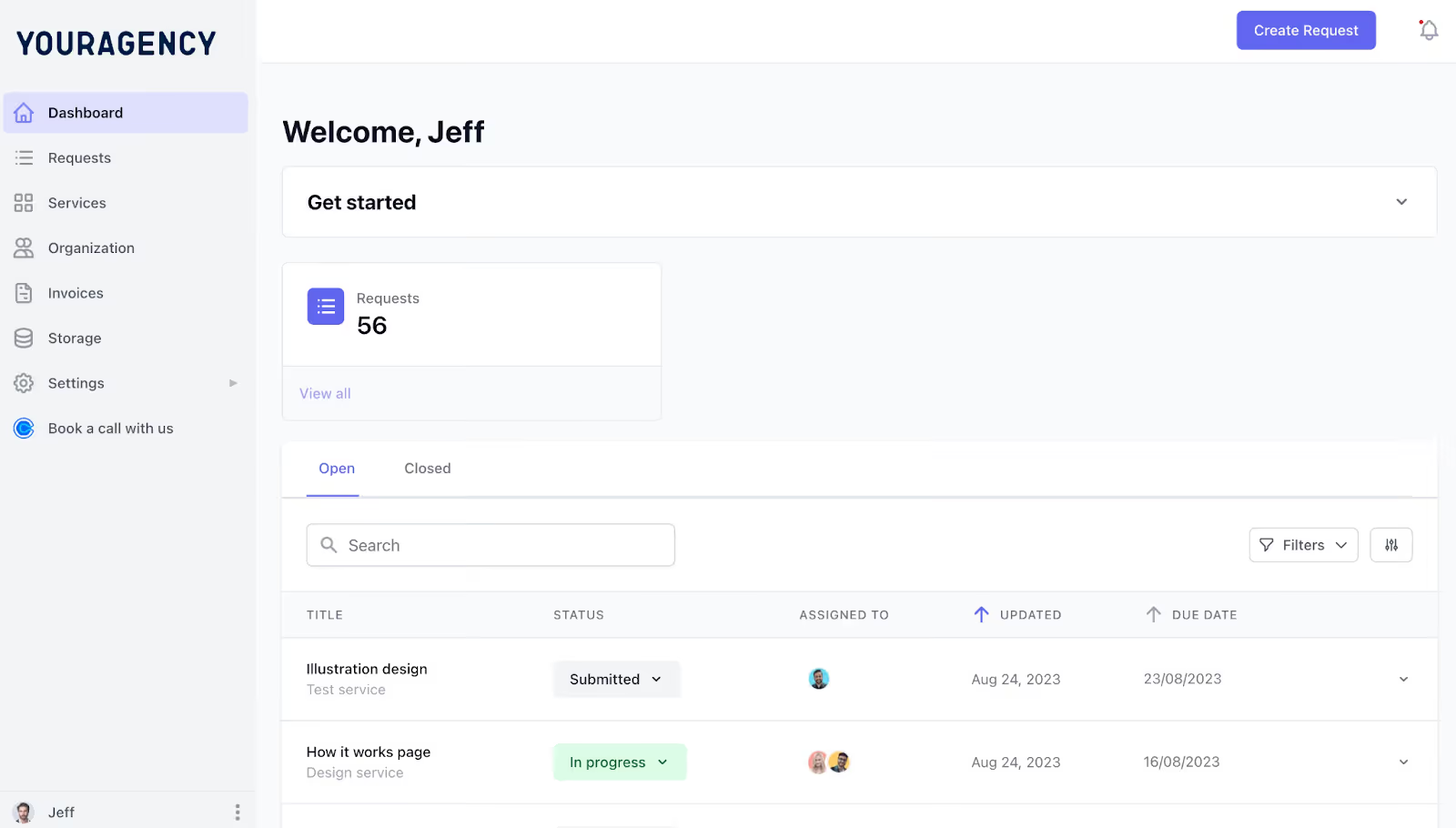
Manyrequest client portal (client view)
It depends. Wrike is usually better if you need strong workflows, visual boards, proofing and approvals for client work.
But Smartsheet wins if you want simple spreadsheet-style tracking, fast setup and easy data reports.
It feels rigid for creative flows, as work stays in rows and cells. This makes client feedback difficult. Client sharing often mixes internal and external views.
You do a lot of manual fixes or email follow-ups. It’s more of an internal tool than a client-facing portal.
Setup takes more time with folders, rules and permissions. The structure can overwhelm small teams or simple projects.
Managing client access adds admin work. It’s powerful but can be a handful for agencies that just want fast execution.
ManyRequests stands out for productized agencies. It’s built for client-facing work. You get clean portals for requests, feedback, approvals and progress tracking.
No grids or heavy setup. Your team gets clear tasks and overhead drops, so you focus on project execution and delivery.
Wrapping it up now, Smartsheet and Wrike are fantastic tools. But neither really fits productized workflows.
ManyRequests is built specifically for productized services.
Your clients get simple portals to submit requests, give feedback, approve work and track progress. No grids, no complicated folders.
Your team gets automatic task creation, clear execution lists and branded updates.
This way, you focus on project delivery and winning more work.
Click here to get started for free.
1. See how ManyRequests works in real life. Start a free trial and experience how productized agencies centralize requests, reduce chaos, and streamline delivery, without changing their entire workflow.
2. Read our Implementation Guide to launch smoothly with your team and clients.
3. Follow us on LinkedIn and YouTube for practical agency growth strategies
4. Check out The Productize Blueprint to learn how to turn your services into a scalable, productized offer.
William Nzewi is a data scientist and a writer. He likes to read and learn new things, especially about tech, business and life.

