Best Client Portal Software for Productized Agencies [2026]
Why do agencies choose ManyRequests? Discover how productized agencies replace 6+ tools, streamline delivery, improve client experience, and scale operations.

Regina Ongkiko

Most agencies build their client portal out of tools that were never designed for it in the first place. Most of the time, a shared Google Drive becomes the "portal." Requests arrive through Slack or WhatsApp. Status updates happen over email. Billing runs through a separate Stripe dashboard no one checks consistently.
That stack works for two or three clients. At ten, it starts cracking. At thirty, it is a full-time ops problem. You can only expect chaos with long email threads, version conflicts, and no centralized tracking, causing requests to get buried or missed.
The best client portal software for productized agencies does four things well:
This list covers the top client portal tools in 2026, evaluated specifically for subscription-based and retainer-driven agency models.
Productized agencies use client portal software to streamline operations, enhance client experiences, and scale their standardized service offerings efficiently. Before comparing tools, it helps to know what actually matters for structured, recurring delivery. Generic portal comparisons evaluate features, but this guide evaluates operational fit.
Your clients should be able to log in and see your agency’s logo and branding, not the software vendor’s logo. If they see another company’s branding, the misalignment slightly breaks trust and consistency. On the other hand, a white-label client portal keeps your productized agency’s brand front and center across the portal, emails, and domain. For agencies gearing up to scale, this isn’t simply a cosmetic decision but a positioning one.
Did you know workers spend nearly 20% of their time searching for internal information or looking for colleagues who can help? These situations pile up and before you know it, you’ve spent a significant number of hours in a day just finding information.
Vague briefs are the leading cause of revision cycles and scope creep. Instead of receiving a vague message buried in Slack or email, an agency client portal with configurable intake forms forces structure upfront. Clients can easily submit scoped requests with the assets, references, dimensions, and deadlines your team needs to start work immediately.
That structure reduces back-and-forth communication and makes delivery far more efficient at scale. This is the difference between a request that enters your queue ready to execute and one that triggers three clarification messages first. For productized agencies handling lots of repeatable work, the experience of having every task come in organized and ready to execute can be transformative.
Getting flooded with random “Just checking in” emails spread throughout the day? That’s a visibility problem, not an operations or a client relationship issue.
It takes an average of 23 minutes and 15 seconds to refocus after an interruption. Conversations get scattered across too many places. Work slows down because everyone is constantly context-switching.
But when clients can see request status themselves (submitted, in progress, in review, delivered), the volume of inbound status questions drops significantly. Your team then gets that time back.
The best client portal software reduces that noise by making project visibility self-service. Clients always know where things stand.
One of the clearest inefficiencies in productized agencies is the gap between billing and fulfillment. The best portals close that gap:
If you have a “portal” which your clients don’t regularly use, that’s not a portal. The client-side experience should require no training: one place to submit work, one place to check progress, one place to handle billing. The simpler it is, the more consistently clients adopt it, and the more organized your operations become.
To help you identify the best client portal software for your specific needs, we compare the seven top client portal tools. Please be aware that each software is reviewed specifically in the context of productized agencies.
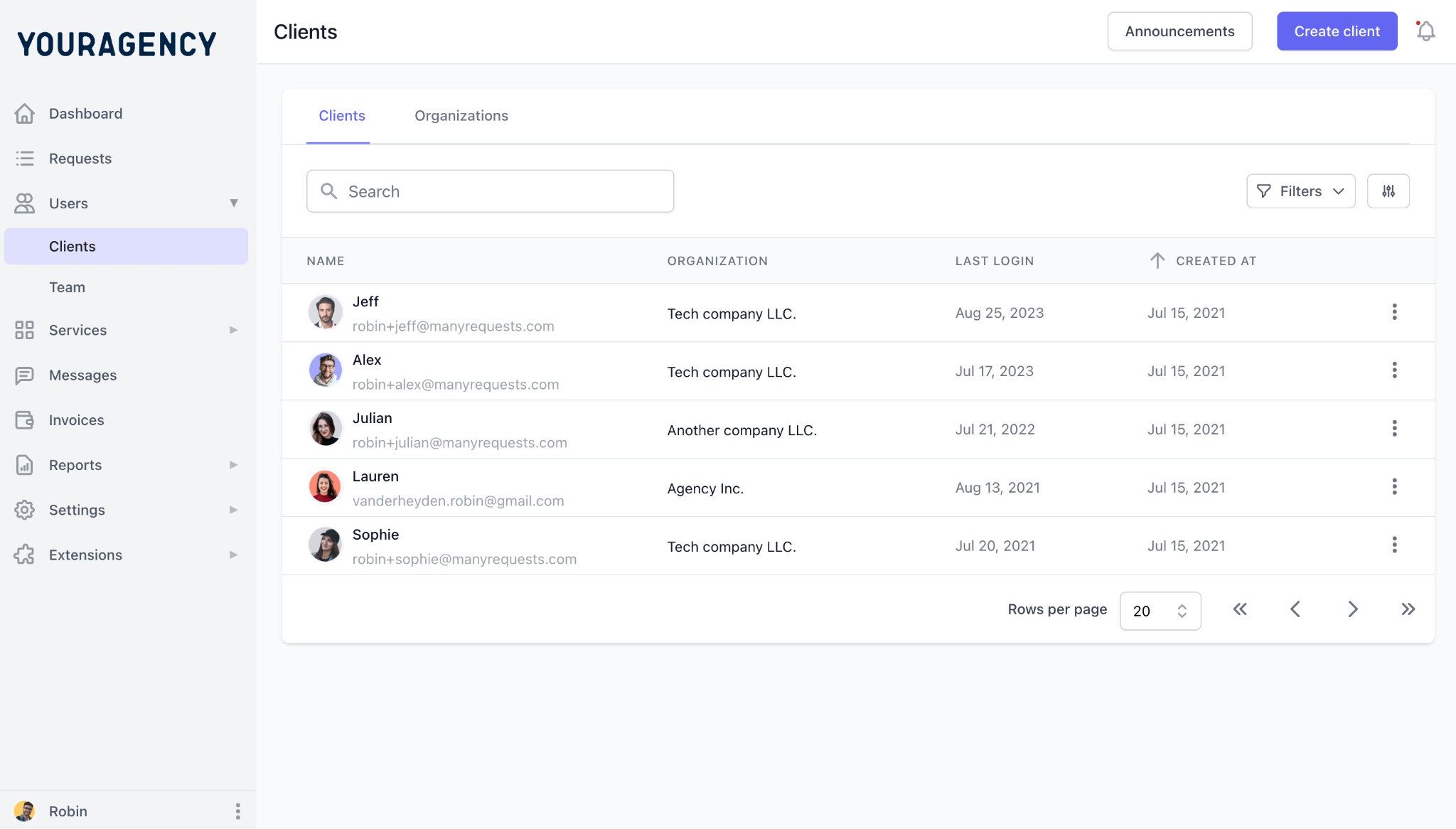
ManyRequests is purpose-built for agencies that sell recurring services. Where most tools on this list are project management platforms or CRMs adapted for client use, ManyRequests is designed around the productized delivery model from the start.
The core client portal features of ManyRequests mirror how a well-run productized agency actually operates: This means there’s structured intake, client portal, request tracking, and subscription billing in one system. Plus, being a white label client portal, it looks like it’s fully our own branded system.
What it does well:
Who it’s built for:
Productized agencies running subscription, retainer, or unlimited-request models who want one streamlined tool for client management, delivery, and billing instead of juggling multiple tools.
Where it falls short:
ManyRequests is optimized for recurring, structured delivery. Agencies running highly bespoke, one-off project or consulting work may find it rigid. Deep technical project management (Gantt charts, resource planning) may still require an additional internal tool.
HoneyBook is a clientflow platform covering proposals, contracts, invoicing, scheduling, and client communication. It is designed to move clients from inquiry to payment with minimal friction, and it does that well.
What it does well:
Who it’s built for:
Basically, businesses where one person manages most of the client relationships directly like individual service providers, freelancers, solo designers, and small solo‑owned businesses.
Where it falls short:
Once you have a delivery team and recurring high-volume requests, HoneyBook starts showing its limits. The workflows are sales-oriented, not operations-oriented. Clients can view documents and pay invoices, but they cannot submit structured requests or track delivery status. It is a strong onboarding tool that stops short of being a delivery portal.
Assembly is a client portal software and collaboration platform built for professional services firms: consulting, accounting, legal, and marketing agencies handling sensitive client work. The interface is simple, clean and modern, making it one of the more polished client-facing experiences on this list.
What it does well:
Who it’s built for: B2B agencies and professional services firms managing sensitive documents, contracts, or regulated workflows where a polished, secure client experience matters.
Where it falls short:
Assembly is built around collaboration, not recurring operational delivery. So if your productized agency needs configurable intake forms, subscription billing, or a high-volume request queue, you will run into limitations quickly. While it handles the relationship side well, it leaves the delivery infrastructure to other tools.
ClickUp is one of the most powerful project management platforms available, full stop. It handles complex task hierarchies, custom workflows, 15-plus view types, and team coordination at scale. For internal operations, it is hard to beat. However, there’s no out-of-the-box branded portal or subscription billing
What it does well:
Who it’s built for: Agencies that need robust internal project and task management and do not need a client-facing portal as part of the same system.
Where it falls short:
ClickUp was built for the people doing the work, not for clients checking on it. You can configure a guest view, but it still requires significant manual setup and still feels like a project management tool underneath. There is no native subscription billing, no structured intake designed for client use, and no branded portal out of the box. For productized delivery, ClickUp is a strong internal tool that needs three to four other platforms to complete the client-facing stack
Notion is a flexible workspace for documentation, wikis, and lightweight project management. In fact, many agencies use it as an internal knowledge base or SOP library. But this flexible workspace and documentation platform isn’t a purpose‑built PM tool, plus billing software.
What it does well:
Who it’s built for:
Notion is for agencies that want a centralized internal knowledge base, SOPs, and lightweight task tracking alongside their primary delivery tool.
Where it falls short:
Notion is not a client portal for agencies. There is no native billing, no intake forms designed for external client use, and no request tracking. Sharing pages with clients is possible but produces a bare, unbranded experience. Setting up anything resembling a portal requires heavy manual configuration that breaks down as client volume grows. For productized delivery, Notion is a documentation tool, not delivery infrastructure.
Clinked is a dedicated white-label client portal built around secure collaboration, file sharing, and branded client workspaces. Unlike general project management tools adapted for client use, Clinked starts from the client-facing side and builds inward.
What it does well:
Who it’s built for:
Agencies that prioritize a deeply branded client experience and handle significant file collaboration, document approvals, or secure communication as part of their delivery workflow.
Where it falls short:
Clinked is a strong portal and collaboration tool, but it is not built around productized delivery workflows. There are no configurable intake forms designed for recurring request submission, and subscription or retainer billing is not natively supported. You would still need a separate tool for structured intake and another for billing, which reintroduces the tool sprawl problem.
SuiteDash is a broad business management platform covering CRM, project management, client portals, file sharing, invoicing, and basic automation in one system. It targets small to mid-size service businesses that want to consolidate multiple tools under one roof.
What it does well:
Who it’s built for:
Small to mid-size service agencies that want broad tool consolidation and are comfortable trading depth in any one area for coverage across all areas.
Where it falls short:
SuiteDash covers a lot of ground but goes deep in a few places. The interface carries the complexity that comes with an all-in-one platform, and clients often find the portal experience less intuitive than purpose-built alternatives. For productized agencies specifically, the intake system is not designed around structured request submission: there are no configurable request forms that scope work before it enters your queue. Billing supports invoicing and some recurring payments, but the connection between payment status and delivery workflow is not as direct as a platform built specifically for subscription-based delivery.
The right client portal software depends on your delivery model. Before deciding, answer these three questions.
1. Is your service model recurring, subscription-based, or retainer-driven?
If yes, billing integration with your delivery workflow is non-negotiable. A tool that handles invoicing but not subscriptions will require manual reconciliation at every billing cycle. That overhead compounds quickly at scale. Look for native subscription support, not a Stripe integration you have to configure yourself.
2. Do your clients submit work requests on an ongoing basis?
If clients submit requests regularly, structured intake is essential. A portal without configurable request forms means every new submission starts with a clarification exchange. At low volume this is manageable. At 20 or 30 active clients it becomes a serious ops drain. The intake form is not a nice-to-have. It is where scope discipline begins.
3. What does your agency need to look like to your clients?
Client portals are part of your positioning. If you are increasing retainer sizes, moving upmarket, or competing for clients who have worked with larger agencies, the experience you deliver matters. A generic shared workspace signals that you are still figuring out your systems. A clean, branded portal under your own domain signals that you have built an operation worth paying for. White-labeling is not cosmetic. It is a pricing enabler.
A general rule on tool stack complexity: A DIY stack of Typeform plus ClickUp plus Stripe plus email works at three to five clients. Between ten and fifteen clients, the coordination overhead becomes a visible drag on delivery quality. That is typically when productized agencies start evaluating purpose-built platforms.
Generic project management tools and shared workspaces work fine early on. As your client base grows and your delivery model matures, the cost of a disconnected stack becomes measurable: in hours spent chasing context, in requests that arrive without scope, in billing cycles that require manual reconciliation, and in clients who email because they have no other way to check on their work.
For productized agencies running recurring, request-driven services, the question eventually comes down to whether you are going to keep stitching tools together or consolidate into one system built for this model.
ManyRequests is built specifically for that second path. Branded portal, structured intake, request tracking, and subscription billing in one place. Your clients get professional experience. Your team stops managing coordination overhead.
Try ManyRequests for free or book a demo to see how it fits your delivery model.
What is a client portal software?
A client portal software gives clients a single, dedicated place to interact with your agency. Rather than requests arriving through email or Slack and updates scattered across multiple threads, everything lives in one system: request submission, delivery tracking, file sharing, feedback, and billing. For productized agencies managing multiple recurring clients simultaneously, a portal is the difference between a scalable delivery operation and a communication backlog that grows every week.
Do I need a separate client portal, or can I use my project management tool?
Technically, you can use a project management tool as a client-facing portal, and many agencies do at the start. The problem is that PM tools are designed for the people delivering the work, not the clients reviewing it. The interface, terminology, and permission structure are built for internal use. Clients end up confused, and the setup required to make it usable externally is significant. A purpose-built client portal gives clients a simpler, cleaner experience without exposing your internal ops.
What is the best client portal for a small productized agency?
For a small productized agency running subscription or retainer services, ManyRequests is the strongest fit. It covers the full stack: branded portal, structured intake, request tracking, and subscription billing in one system. You are not paying for features you do not need and you are not piecing together three tools to approximate what one platform handles natively. As your client count grows, the system scales with the same infrastructure.
Can client portal software handle subscription billing?
Most tools on this list support invoicing in some form. Subscription billing with recurring cycles tied directly to a delivery workflow is a smaller category. ManyRequests handles this natively. Other tools like HoneyBook support strong invoicing but are not built around subscription delivery models. Before choosing a tool, verify whether it supports automatic recurring billing or requires manual invoice creation each cycle, and whether payment status connects to any part of your delivery workflow.
When should a productized agency stop using a DIY tool stack and switch to a dedicated portal?
The signal is usually a combination of three things: clients regularly asking for status updates your team has to field manually, requests arriving without enough information to start work immediately, and billing and delivery living in completely separate systems. Any one of these is manageable early on. When all three are happening simultaneously, the coordination cost is real and compounding. Most productized agencies hit this threshold somewhere between eight and fifteen active clients.
1. See how ManyRequests works in real life. Start a free trial and experience how productized agencies centralize requests, reduce chaos, and streamline delivery, without changing their entire workflow.
2. Read our Implementation Guide to launch smoothly with your team and clients.
3. Follow us on LinkedIn and YouTube for practical agency growth strategies
4. Check out The Productize Blueprint to learn how to turn your services into a scalable, productized offer.


