Dubsado vs ClickUp: The Face-Off That Productized Agencies Need
Choosing between Dubsado vs ClickUp? See which tool works best for agency operations and client delivery.

Regina Ongkiko
If you’re choosing between Dubsado vs ClickUp for your productized agency, you’re probably comparing their features side-by-side or looking at how their different subscription tiers differ.
The questions you may need to be asking yourself are:
Here’s the short answer: Neither Dubsado nor ClickUp was built to handle ongoing, end-to-end subscription delivery for productized agencies. Dubsado excels at the beginning of the client relationship, and ClickUp owns the internal execution layer.
But the gap between them is where things break. Contracts live in Dubsado. Tasks live in ClickUp. Client requests and feedback are exchanged via email. Billing runs on a timer, so the invoice goes out from Dubsado on schedule regardless if the work is done or not. Nobody has a full picture, and your team is manually bridging all of it across different tools. Every new retainer client adds more revenue, but also more bridging.
This article breaks down what Dubsado vs ClickUp actually does well, where each one breaks operationally, and why ManyRequests fits the recurring delivery model better than either.
Dubsado is a client management software for agencies built to professionalize the business side of creative services. Think about everything that happens before a designer opens Figma. You have proposals, contracts, invoices, onboarding sequences. That's Dubsado's territory.
Here’s a sample scenario: You set up a proposal. The client signs the contract online and pays the invoice. Dubsado triggers an automated onboarding workflow: welcome packet, intake form, calendar invite. From lead to booked client, the entire sequence runs on autopilot.
For freelancers and boutique studios running project-based work, each engagement usually has a defined scope and a defined end. In situations like this, Dubsado is exceptionally powerful. It's especially strong for:
When your model shifts from "project-based" to "ongoing retainer," Dubsado's architecture starts working against you. Yes, it’s organized and streamlined at the beginning with signed contracts and seamless onboarding.
But once you start receiving new requests, you realize that Dubsado has no capability to receive them and manage them. So they pile up in inboxes instead. Here’s why Dubsado cannot support the entire operations of subscription agencies:
1. There is no native request intake for recurring work.
Workflows are triggered by contract signing, not by an open-ended request queue. When a retainer client needs a new asset, they still have to email you. Or Slack you. Or fill out a random form that goes to your inbox or a Google Sheet. Your team still has to manually convert that into a task somewhere else.
That process works with three clients. But imagine if you have fifteen clients on retainer. It just doesn’t work. You’ll end up with a pile of requests on different platforms, and the deployment will be delayed as you manually have to process them.
2. There is no operational view of ongoing delivery.
Dubsado lets you track "pipeline health" — but that refers to sales pipeline, not task cadence. There's no queue. No active limit enforcement. No way to see how many open requests are in flight across all your clients.
3. Client visibility disappears after onboarding.
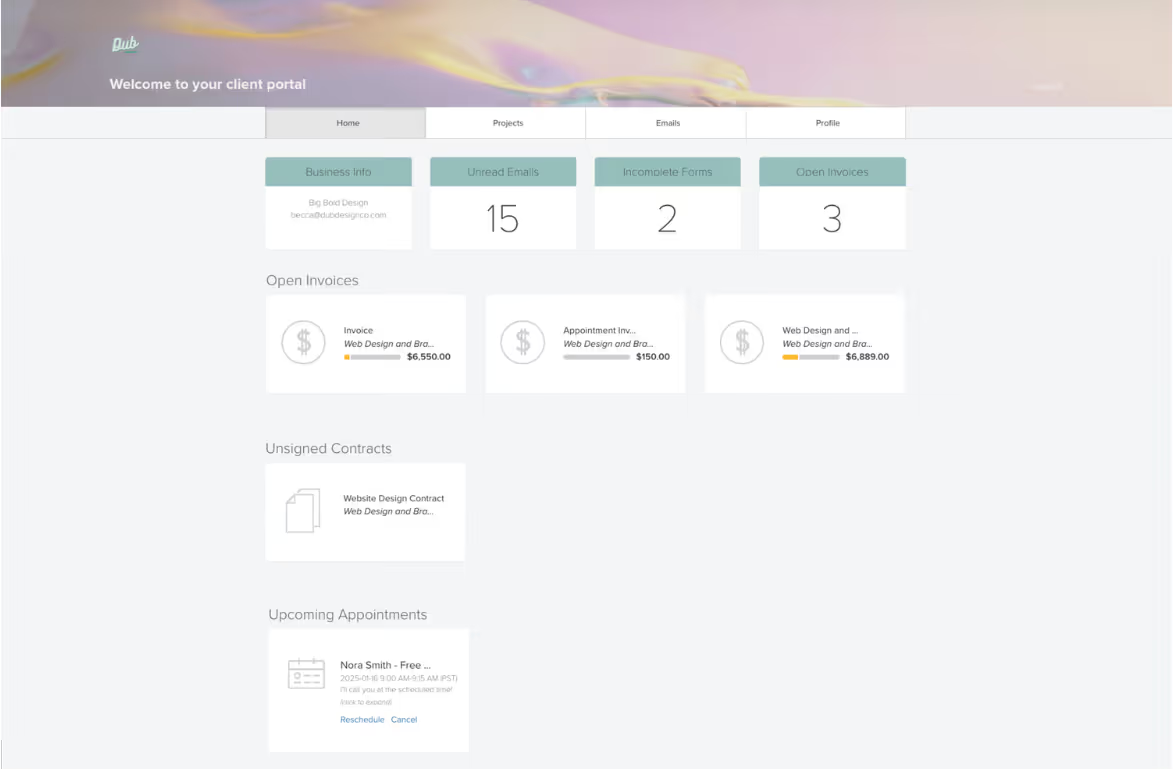
Once the contract is signed and the welcome email is sent, clients aren't meant to live inside Dubsado. The client portal lets them see invoices and appointment status — but there's no way for them to submit a new request, check where their current work stands, or review a deliverable without emailing you.
4. Billing isn't tied to delivery.
Dubsado supports recurring invoices and autopay, but they're strictly time-based. If a client's card fails, their work doesn't pause. If they haven't used their allocation, there's no visibility into that. Billing and operations are completely disconnected.
5. No SLA or cadence enforcement.
You can set up repeating reminders, but Dubsado has no mechanism for tracking turnaround commitments or automatically managing request intervals tied to your service tiers.
The reality check: Dubsado is built around the idea that work has a defined scope and a defined end. Its workflows, statuses, and automations are structured toward completion. However, creative services subscriptions move toward continuity. So, the more clients you add, the more friction shows up.
Picture what happens when you add your 10th retainer client in Dubsado. You now have 10 separate clients emailing or messaging requests into different inboxes. Your team manually converts each message into a task in another system. Status updates require someone to send individual emails. Billing reconciliation is done manually at the end of the month. Every new client multiplies that overhead — and there's no system forcing any of it to be consistent.
The key takeaway: Dubsado is excellent at starting client relationships. It's not built to sustain them at scale.
ClickUp for agencies is a work management platform built for internal teams of different sizes and across different industries. Even for large businesses and enterprises, each smaller team or department can structure their internal workflows. It gives you tasks, subtasks, assignees, priorities, deadlines, workload views, automations, and dependency mapping across projects and departments. For an ops-heavy internal team that collaborates frequently, it's genuinely powerful.
Once onboarding is done and the work starts, someone has to manage the production flow and actual creative work. ClickUp does that really well, but internally. You can say it’s a project manager’s dream, with the versatility in dashboard views. Everything that happens before a designer ships a deliverable is easily accessible.
A design request comes in (via whatever channel). A task gets created. The task gets assigned. Priorities are set, deadlines attached, workload checked. When the design is done, an internal approval flow runs. ClickUp turns production chaos into structured execution across your team.
ClickUp is especially strong for:
Execution is only one part of the playbook. ClickUp handles it well. But it doesn't handle the other parts at all. As flexible and robust as ClickUp is, here are the reasons why it doesn’t optimize the workflow of a productized agency.
The reality check: Imagine you bring on a new retainer client. You spend time building out a ClickUp space, configuring permissions, and figuring out what the client can and can't see. You invite them and they message you asking why they can see six projects that have nothing to do with them. You fix the permissions, but now they can't see the status of their own requests. You go back to emailing updates back and forth. Meanwhile, billing is in Stripe, contracts are in Dubsado, and approvals are happening in email. Your team is the connective tissue (barely) holding all of this together.
The key takeaway: ClickUp manages tasks well. However, productized agencies also need to manage ongoing client expectations, delivery cadence, and billing, and those aren't the same thing.
The quick summary:
Simply put, a productized agency doesn't just sell a website redesign. It sells design capacity every month. That difference changes everything operationally. It sells access to ongoing execution. There are no fixed deliverables or a single scoped outcome.
Client onboarding → Request Intake → Delivery → Approvals → Billing → Renewal → Repeat
Now if you find yourself asking: Where do Dubsado and ClickUp believe the “work” happens? That belief also determines where they fall short.
When you look at it from the agency lifecycle, Dubsado has “Client Onboarding” down pat. The Billing part is also functional, but only from a time-based perspective. So invoices get sent every 15th or 30th, regardless if the newly requested deliverable has been submitted or not. This can be very confusing to oversee, especially if you’re handling multiple clients.
ClickUp has the “Delivery” portion of the lifecycle covered. Once a client request is encoded into ClickUp’s system as a task, the internal workflow is smooth. However, it’s what happens before and after the Delivery portion that can cause delays and friction.
Neither tool is weak. The problem is the seam between them. Every time information crosses systems, context compresses. Or ownership blurs, narrowing visibility.
Here’s what that costs you:
Here’s what that looks like:
A client submits a request via email. Someone reads it, interprets it, and creates a task in ClickUp. Context is already compressed.
Multiply that by 15 clients, and you don't have just a software problem. You have a structural one.
Look back at the lifecycle:
Client onboarding → Request Intake → Delivery → Approvals → Billing → Renewal → Repeat
Now imagine that entire loop happening in one environment. ManyRequests spans the entire subscription lifecycle, not just the onboarding, not just the delivery, not just the billing.
ManyRequests is the infrastructure layer for productized subscription agencies that defines how your business operates, rather than an add-on tool that just supports a part of your workflow.
Dubsado is excellent at launching and formalizing the beginning of a client relationship. If your business revolves around proposals, contracts, structured onboarding flows, and milestone-based invoicing, Dubsado feels powerful because that’s exactly where it’s designed to operate.
It makes sense when:
For productized agencies operating on a subscription basis, Dubsado becomes an edge tool, not your operating system. It handles contracts and invoices well, but doesn’t manage recurring delivery logic.
ClickUp is built for the ins and outs of internal coordination. If your team handles layered task dependencies, cross-functional collaboration, detailed automation, and internal reporting, ClickUp can feel indispensable.
It makes sense when:
ClickUp works best when clients are intentionally kept out of the system. The moment you try to make it a shared environment between you and your clients, you face a tradeoff.
Since agencies operate on recurring service delivery, these three things should be connected:
If those three don’t speak to each other, your team becomes the connector. (Real talk: teams don’t scale as well as systems.)
If your agency runs on retainers, subscriptions, or unlimited requests, ManyRequests is the complete system. Not just because it has more features, but because it was designed specifically with the productized agency’s workflow in mind.
If you’re evaluating your stack, don’t just compare features. Compare how the tools work with your actual operations.
See a live subscription workflow and watch how requests, delivery, approvals, and billing move inside a single system with ManyRequests.
Explore real examples of request-based delivery: how queues are structured, how active limits work, how visibility is handled without exposing internal chaos.
Or start your free 14-day trial today to explore on your own.
Neither is built specifically for subscription delivery. Dubsado focuses on onboarding and administrative workflows. ClickUp focuses on internal task management. Subscription agencies require a system that connects requests, delivery, and billing.
Only partially. ClickUp can be a Dubsado alternative, but it doesn’t handle contracts, recurring billing, or client-facing onboarding. You would still need additional tools for those layers.
Not well for subscription models. While it supports recurring invoices, it lacks request-based delivery systems, approval workflows, and ongoing operational visibility.
A client-facing subscription platform like ManyRequests that combines request intake, delivery workflow, approvals, and billing logic into one environment.
No. It supports design, marketing, development, operations, and other recurring service models built on subscription or retainer-based delivery.
1. See how ManyRequests works in real life. Start a free trial and experience how productized agencies centralize requests, reduce chaos, and streamline delivery, without changing their entire workflow.
2. Read our Implementation Guide to launch smoothly with your team and clients.
3. Follow us on LinkedIn and YouTube for practical agency growth strategies
4. Check out The Productize Blueprint to learn how to turn your services into a scalable, productized offer.


