How Agencies Can Reduce Back and Forth Emails [2026]
Reduce back and forth emails with clients using better systems for requests, feedback, approvals, and project updates.

Adetola Rachael Iyanuoluwa
Back-and-forth email with clients is the tax most agencies never put on an invoice.
Let's say you have 15 clients, each sending 2 email chains a week. If you count 20 minutes per chain to read each thread, switch context, and still reply, you're losing as much as 10 hours a week.
If you're dealing with too many back-and-forth emails, the reason is structural. Email was built to send messages one after the other, in a line. Running a dozen client projects through it is a different job, so the usual advice on how to stop back-and-forth emails (shorter subject lines, one question per email) only treats the symptom.
The better fix is to take client work out of the inbox and give clients one place to submit it and watch it move themselves. That's what a client portal does.
In this article, I'll walk you through how to reduce back-and-forth emails with clients through five parts I call the Self-Serve Client System, each one removing a reason a client would email you in the first place.
Clients email because your setup hides the information they need, and email is the only handle they have to reach it. They're not difficult. Ask what a client is actually trying to get with each message, and the pattern gets obvious fast.
Take the client who asks for a status update even though nothing has changed since Tuesday. They're not checking up on you. They're managing the anxiety of not being able to see progress. The work is moving on a board only your team can look at, so from where they sit, silence looks like a stall.
When a client keeps sending status checks, the problem is almost never that they communicate too much. It's that you've left them no way to see the work for themselves, so the inbox becomes their only window into it. Fix the visibility and the emails stop.
Every recurring email you get maps to something structural that's missing. Here's the translation:
Read that last column again. Not one of those problems gets solved by a better-worded email. Each one is a missing piece of structure, and the emails are just the symptom.
A handful of email habits can turn a two-message exchange into a nine-message thread. And the agencies most guilty of them are usually the ones that pride themselves on being responsive. They include:
Fast replies feel like great service. What they actually teach your client is to treat your inbox like a chat window, firing off half-formed thoughts the second each one lands instead of sending you one clear message.
"Let me know your thoughts" invites a rambling reply that opens three new questions. "Do you want option A or option B by Thursday?" closes the loop and gives you an answer you can act on.
The client answers the first thing, misses the other three, and now you're sending a follow-up just to chase down what they skipped.
When you update the client on every small move — "we've started the copy," then an hour later "copy's with the editor now" — you train them to watch over your shoulder, and then to panic the moment you go quiet to actually do the work.
The second you let the conversation wander into personal email, WhatsApp, or a text, the record splits across five places and approvals go missing.
You can coach your team out of all five, and you should. But even when your team does everything right, the emails keep coming, because email still can't show your client where their project stands or keep their files in one place. Better habits don't fix that. A better setup does, and that's what the rest of this piece is about.
Rather than writing better emails, give your client a platform to answer their own questions, and they don't have to email you. This is the heart of client email management for agencies. I call it the Self-Serve Client System, and these are the five parts:
The back-and-forth starts at the brief. Your client sends "can you design a landing page?" and now you're sending four emails just to get the specs and the files they forgot to attach.
A structured intake form asks for all of it up front, and the questions shift based on what they're asking for, so the brief comes in complete the first time. That clears out most of your clarification emails right away, because everything's answered before the work even hits your queue.
And scope creep starts here too, so a form that says what's included and what isn't heads off the "can you also just..." email a week later.
Most of your email is just clients asking where things stand. And they only ask because they can't see the work for themselves. So show them. Give them a platform they can open any time, day or night, that tells them exactly what stage their request is at.
Once your client can see "In progress, due Friday" on their own, they've got no reason to send the "any update?" email. This way, you don't have to reply faster when there's no questions asked.
Right now your files and decisions are scattered across email threads. A logo you delivered is lost in the threads and you have to look for it every time the client makes reference.
So put it all in one place.
When every request holds its own messages, its own files, and a record of what was approved, the client stops asking you to resend things and stops second-guessing what they signed off on.
It's all right there, for you and for them.
A lot of the emails you get are just the client guessing at rules you never gave them, so lay the rules down from day one. Tell them how updates will reach them and how often, what response time to expect, and put your revision policy in the same place so anything out of scope has a clear path. Write it down once, hand it over at onboarding, and swap in your own details. Here's an example:
How we'll work together
Setting this once replaces small guesses with one shared rule, and you should communicate these rules in writing so it's easy to refer back to it. ManyRequests created a series of templates for different industries to help you in these situations.
The first four parts wait for your client to come looking. This one gets to them first.
Every time the status changes, they get a quick heads-up, and once a week you send a short update on a set day. So they always know where things stand before they'd ever think to email you.
A client who knows they'll hear from you on Friday doesn't email you on Tuesday. And you don't write any of it yourself. The updates are automated, so they fire off when you finish a task.
Put the five together and it's simple. The first four let your client find the answer on their own. This one hands it to them before they go looking. Either way, the email never gets sent.
You could build the Self-Serve Client System yourself by piecing together a form tool, a project board, and a scheduler. The problem is those tools don't talk to each other, so you end up with the same scattered mess you were trying to get away from.
ManyRequests runs all five parts as one system, under your own brand. Here's how each part works.
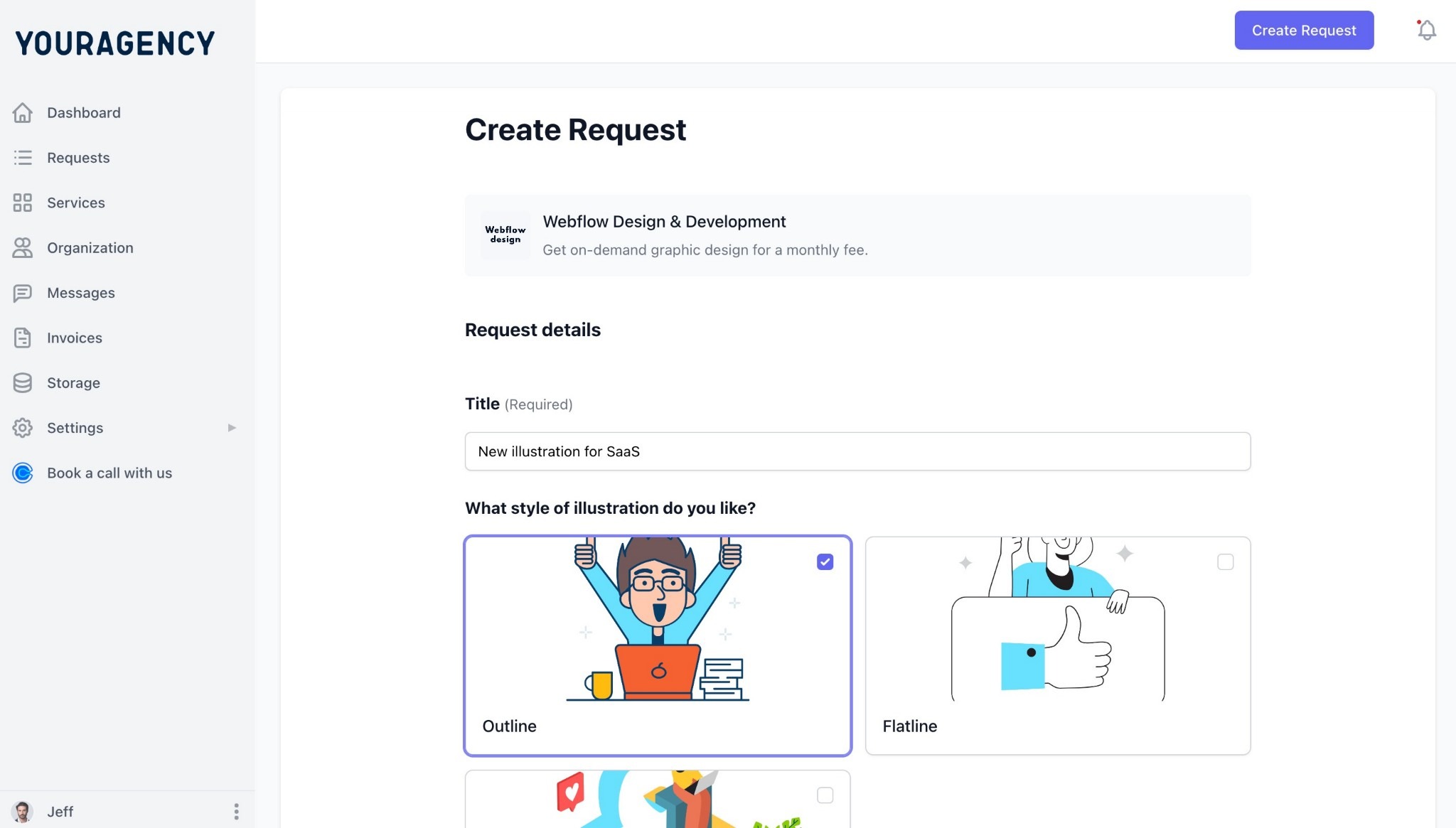
Clients submit work through request forms that ask different questions based on what they need, so the full brief comes in before anyone starts. This way, you get a scoped request, rather than an email chain.
Every request your client submits sits in a queue they can open any time, and each one carries its status — To Do, In Progress, Pending Feedback, Revisions Needed, Completed — along with the due date.
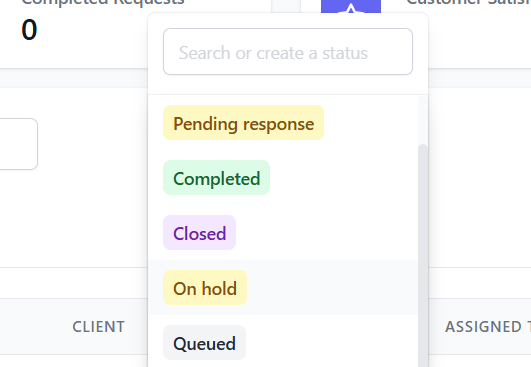
As your team works, they move the request from one status to the next, and that change shows up on your client's end right away.
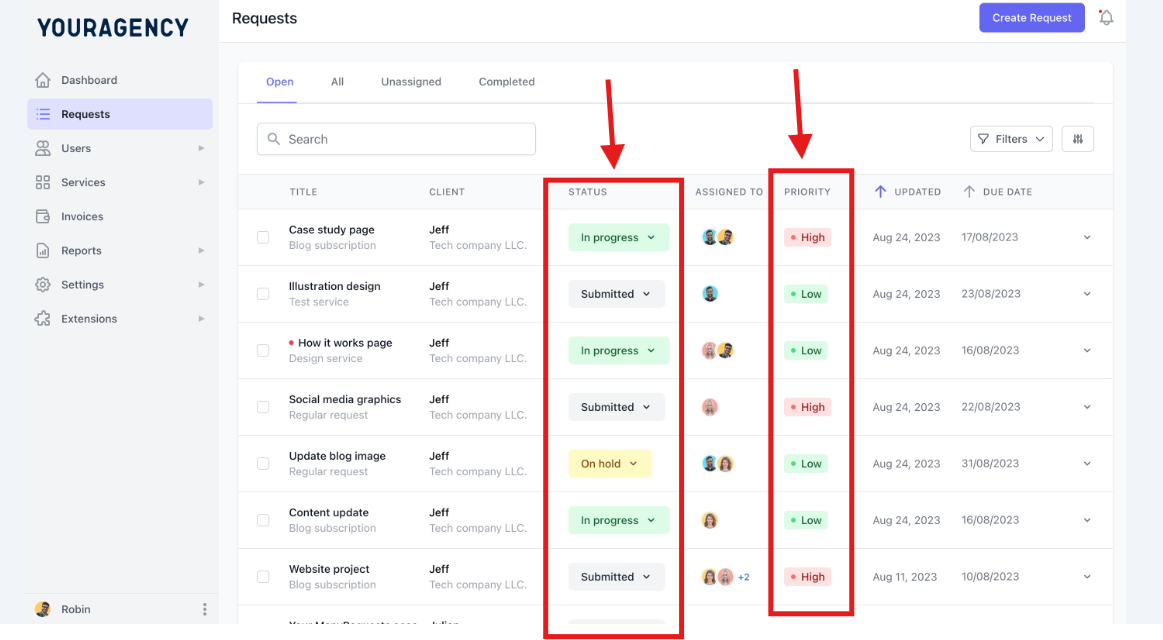
So when a designer picks up the task and marks it In Progress, your client sees In Progress. They log in, check where things stand, and that's their answer.
Every message and file sits inside the request it belongs to, approvals included. So a month later, when you need to know what was said or which version got signed off, it's all on the one request instead of scattered across your inbox.
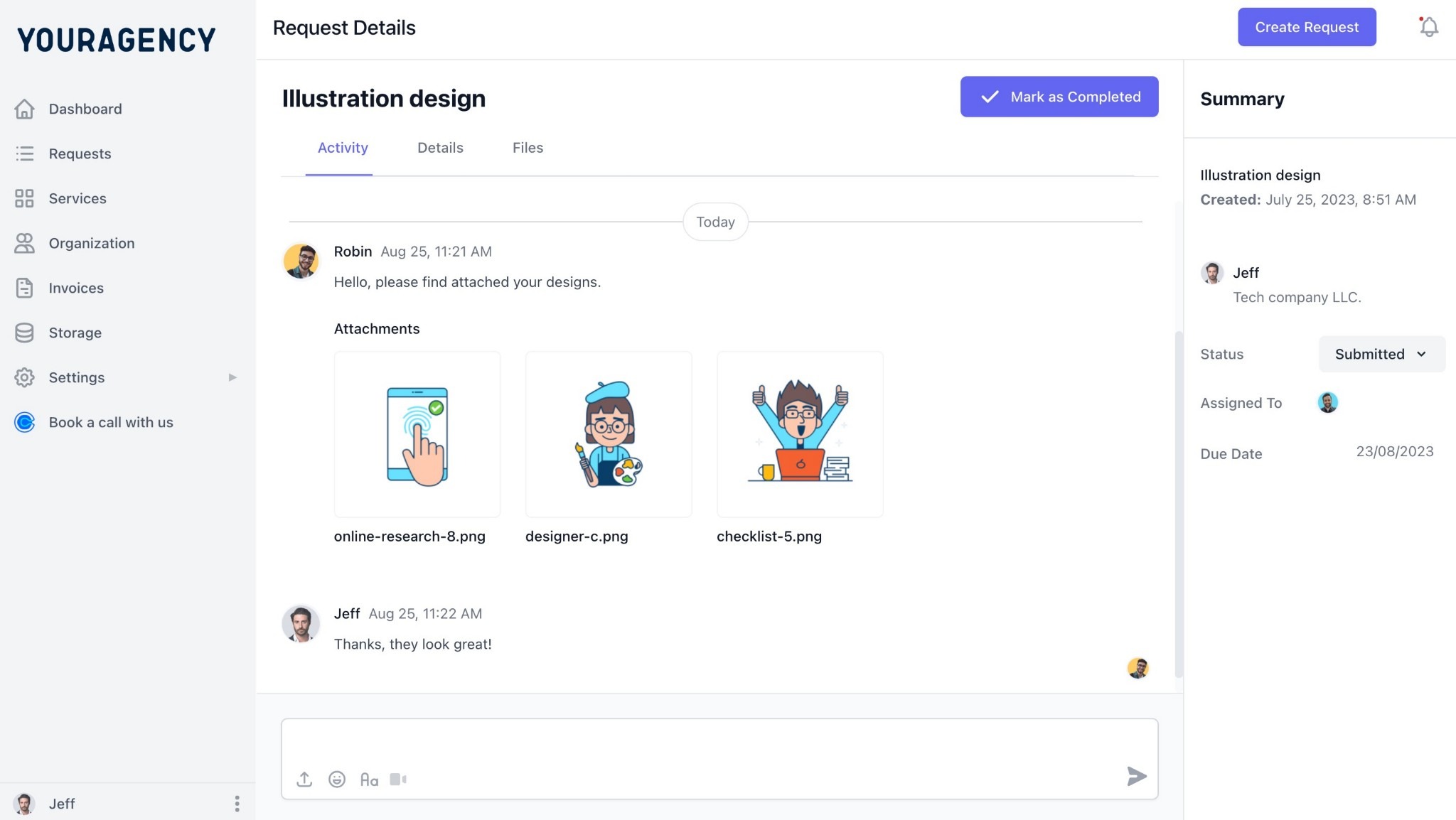
And if your client replies to a portal message straight from their own email, that reply drops back into the request as a comment, so the thread stays in one place even when they answer the old way.
You deliver the work into the portal, and your client leaves feedback right on the file, marking up images, PDFs, and video. They click the exact spot they mean and leave a comment there, so "make the blue part pop" becomes a note pinned to the blue part.
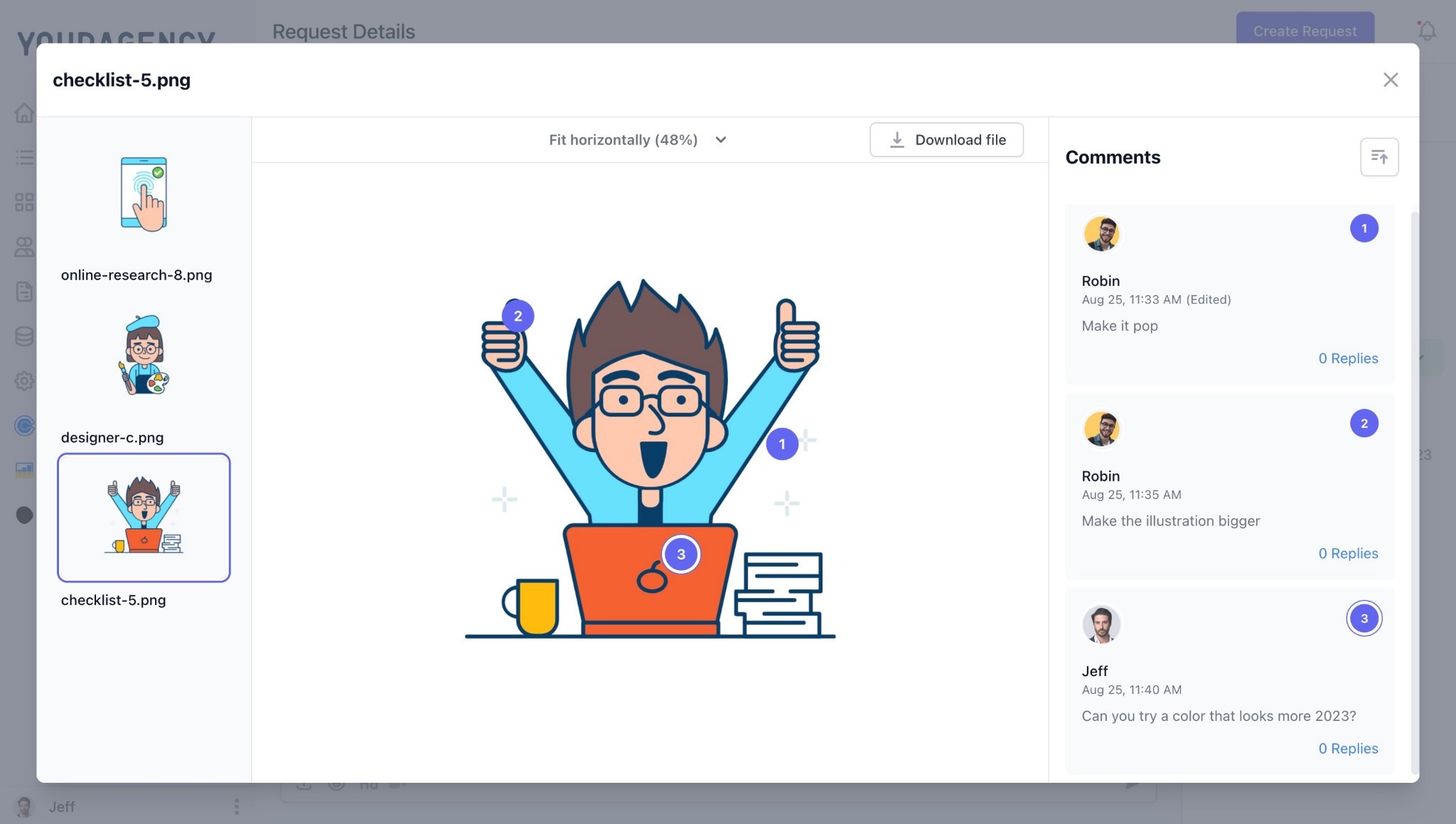
Your designer sees what to change and where, and no one needs to write a single email.
Every status change and scheduled update goes out on its own, so your client stays in the loop without you or your team writing a thing.
Now the honest part, because a portal isn't a magic switch. It won't empty your inbox on its own. If you keep answering client work over email, your clients will keep emailing you, because it's the easy option and you're the one making it easy.
The client portal only works when you make it the way work actually happens. So when a request comes in by email, you move it into the portal and reply with the link. Every time, until it sticks.
ManyRequests makes this easier, since even that email-to-request path pulls stray emails back into the system instead of letting them scatter. The tool takes away the reason to email. Pointing your clients back to the portal is the part that's still on you.
A quiet inbox isn't really about you getting your time back, though you will, and it's great when it happens. It's about how the whole thing feels to your client.
When they can log in, see exactly where their project is, find every file, and leave feedback right on the work, they're not sitting there wondering if they should chase you.
They feel taken care of. And a client who feels taken care of is a client who sticks around.
That's the real reason to take client work out of email. Not just to reduce the back-and-forth, but to replace it with something your clients actually prefer. Give them one place to submit work and follow it through to completion, and the emails get sorted out.
That's what ManyRequests was built to do. You can try it free for 14 days, no credit card, and see how quiet your inbox gets.
Give them a way to see the status themselves. When a client can log in and see their request’s status, the reason to email is gone.
Get the work out of your inbox and into a portal that holds the brief, the files, and the full history in one place. Better emails help a little. Removing the reason to email helps a lot.
They run delivery through a client portal and use email only as a nudge, for example "something's ready, log in to see it." Requests, feedback, and sign-offs all happen in the portal.
Make the first login easy and hold the line. Send a magic-link invite, walk them through it on your kickoff call, and when they email you anyway, move it into the portal and reply with the link. Most settle in within a couple of weeks.
1. See how ManyRequests works in real life. Start a free trial and experience how productized agencies centralize requests, reduce chaos, and streamline delivery, without changing their entire workflow.
2. Read our Implementation Guide to launch smoothly with your team and clients.
3. Follow us on LinkedIn and YouTube for practical agency growth strategies
4. Check out The Productize Blueprint to learn how to turn your services into a scalable, productized offer.
Adetola Rachael Iyanuoluwa is a B2B SaaS writer and content marketer with 4+ years of experience creating SEO, human-focused content. She writes in-depth how-to guides and comparison articles content that help SaaS companies grow organic traffic and turn readers into customers. At ManyRequests, she produces practical, well-researched content that helps agencies and service businesses streamline operations and scale sustainably.