Free Social Media Scope of Work Template [Docs / DOCX]
You've done enough social media projects to know clients usually mix up details, approval times, and end up affecting how you manage their pages.
In this article, I'll share a social media scope of work template that can help you define project scope to your clients in detail.
What is a Social Media Scope Statement?
A social media scope statement defines what you will deliver for a client, and what you will not.
It outlines the channels you’ll manage, the number of posts, the type of content (graphics, videos, captions), turnaround times, approval steps, and any platform-specific deliverables.
It also states the services that will not be included in the project, so you don't end up overworking on tasks that weren't discussed initially.
Why You Need a Social Media Scope Statement
Scope creep isn't the only reason why you need a project scope, even though it is one of the most important reasons why you should draft one for every client. I’ll share other reasons why you need a social media scope of work:
1. Social Media Work Is Made Of Micro-tasks That Clients Never See.
There are so many behind the scenes with completing a social media project that your clients won't see.
I mean, your clients see a post as one deliverable.
To them, you were tasked with making a post per week (for instance), and so you did. But for that same post, your team had to:
- Create concept, research, and message alignment
- Draft multiple caption variations,
- Design assets in multiple sizes,
- Export formats based on the platform you're working on,
- Track usage rights for stock or brand assets,
- Get compliance sign-off (yes, even for organic content),
- Schedule through third-party tools,
- Double-check link previews and hashtags,
- And still monitor comments after posting.
Project scopes show your clients every process that goes into the final deliverables they see.
It spells out everything you do behind the scenes, so they don't assume more content, for example, is a small task, and they understand why your service is priced the way it is.
2. It Helps You Avoid Scope Creep
Social media clients can be notorious for unplanned requests.
For instance, your client may see a trending audio, and ask you for a Reel before it gets cold, or they’ve probably tagged you in a competitor's post and asked you to recreate it the same day.
To them, it could be an easy task (especially when you didn't do the first point), and it's even more likely these small tasks weren't a part of the project discussion, but because you didn't draft a proper scope, it could be difficult to turn them down.
A clear scope statement lets you outline the exact number of posts, formats (Reels, carousels, Stories), and revision rounds you’ll provide. It also gives you a framework to price additional deliverables or urgent requests.
For instance, if you use ManyRequests, the platform provides a Service Catalog feature that lets you show upfront pricing for any add-on task that the client may offer.
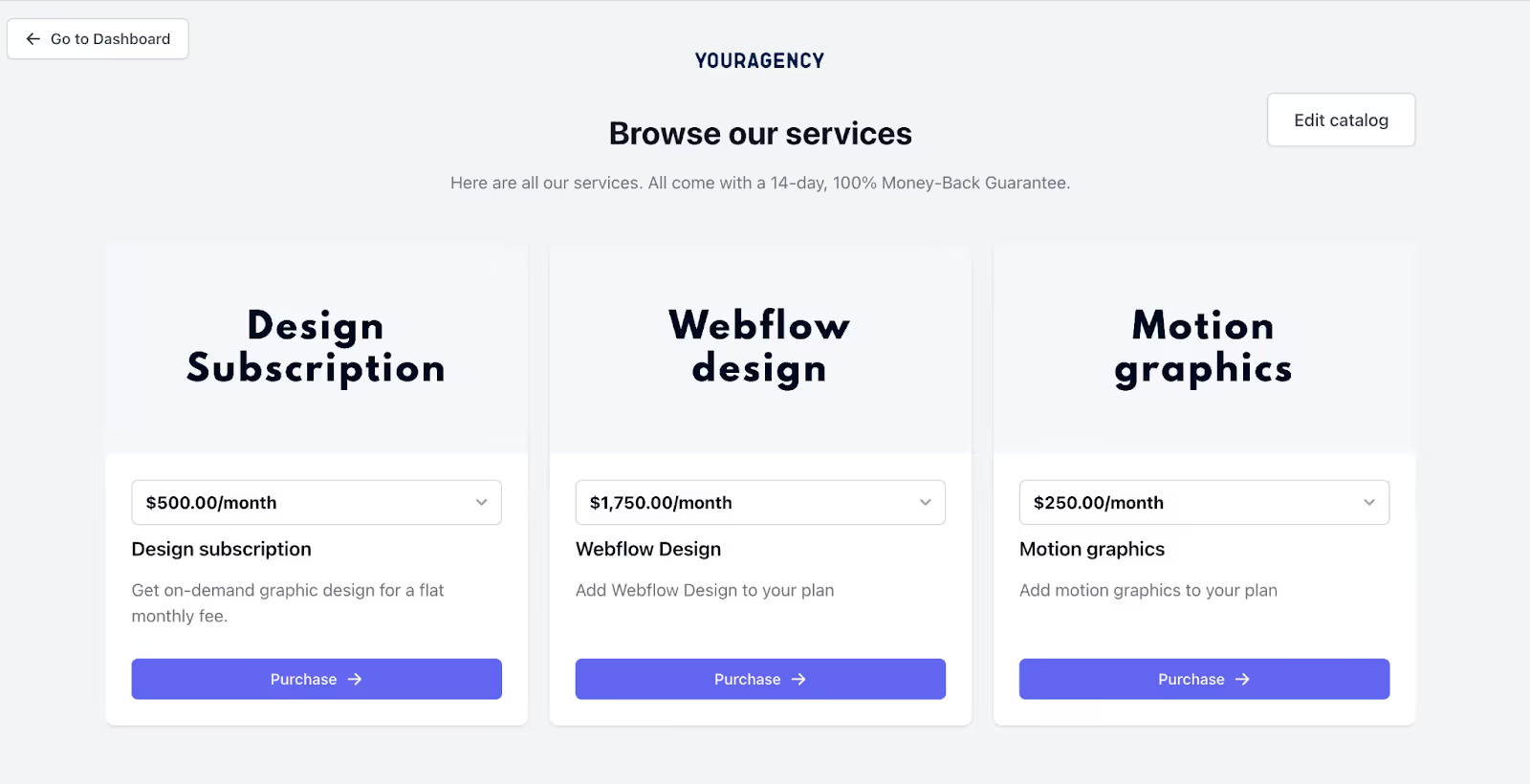
They can check your catalogue, see the cost before they even ask you, and you can avoid unpaid labour.
3. It Gets the Client Assets To You Faster
Unlike design or dev work, you can't complete the project without client assets. Your clients would need to send product shots, brand guidelines, creator's content, campaign inputs, and more, to help you create content that matches with their audience.
Now, if they don't send these assets to you on time, you could miss deadlines. With your scope of work, you can write down every client asset you need and when you need them during the project duration, so the client knows their responsibilities and keeps to it.
4. It Helps Clients Understand Social Platform Differences.
Your clients may think you need the same resources and budget for every platform you manage for them, but your scope shows them the difference.
- Instagram needs visual storytelling, Reels, Stories, and feed planning.
- LinkedIn needs thought leadership and data-driven, authority-building posts.
- TikTok needs scripting, production, editing, and trend timing.
- YouTube Shorts needs different pacing, edits, hooks, and video timing.
- X (Twitter) needs high-frequency posting and daily monitoring.
These platforms don't share the same asset requirements or content processes. You don't even post them at the same time. A scope statement shows clients the actual cost of managing each platform.
Creating Your Social Media Scope Statement
A strong social media scope statement builds the operational structure your team will use to produce content consistently and manage client expectations.
Here’s how to create a scope:
1. List Every Service You’ll Provide.
Most scopes fail because agencies describe services vaguely. If you wrote “Manage Instagram and LinkedIn” in your project scope, it could mean different things to different clients.
Instead, you should define your services in terms that reflect the actual workflow, like this:
- Content Strategy: research, brand positioning, monthly themes, campaign planning.
- Content Creation: concepts, copywriting, asset design, video production.
- Publishing: scheduling, formatting, A/B testing, link tracking.
- Community Management: response time expectations, escalation rules.
- Reporting: frequency, metrics included, explanation expectations.
2. Outline Your Content Production Cycle
Social media only works when your team follows a predictable rhythm. Your scope should map out your cycle clearly, including:
- When you’ll finalize the briefs.
- When you’ll deliver drafts.
- When your clients should send feedback.
- How long revisions will take.
- When posts go live.
Doing this protects you from clients who approve content on the 29th and expect a full calendar on the 1st.
3. Define Key Assumptions around Assets and Inputs
Assumptions are the unspoken agreements that keep the project moving, and in this case, they are clarifications on your responsibility and the client's responsibility.
Write out the assets you need from the client, when you need them, who will provide them, when they will provide, and what happens when they're late.
4. Add Out-of-scope
Out-of-scope work is anything you won’t be doing under the current agreement. When you're writing this section, be specific about the tasks that will not be part of the project.
For example, depending on the social media project, it could be:
- Paid ad management.
- Daily community management.
- Reshooting content due to client delays.
- Unlimited revisions
5. Add the deliverables for each platform
Break down deliverables if you're handling multiple platforms for one client. Write out the deliverables for each platform so clients know what to expect.
Here's an example:
- Instagram: carousels, Reels, Stories
- TikTok: short-form video w/ scripting & editing
- LinkedIn: text posts, graphics
- X (Twitter): high-frequency posting
- YouTube Shorts: video editing and optimization
6. Include Revision Boundaries
Add the number of revisions you’ll take, and include the pricing for any add-on revision. If the client wants you to go through another post after the two rounds of revision you provide, you can send them a new bill for the revision.
8. Add KPIs Only If You Control the Variables
Be cautious with KPIs. If you don’t control product quality, pricing, offer timelines, or page experience, you shouldn’t own performance metrics tied directly to revenue.
Instead, define KPIs tied to your controllables, like the consistency of publishing, creative quality standards, and engagement-style metrics, so you're not held accountable for factors outside your influence.
How To Use Our Free Social Media Scope Statement Template
Here's how to customize our free social media scope statement template to fit your agency's needs:
- Download the template from our website.
- Edit the text to add your business name and logo.
- Fill in all highlighted spaces and italicized words with your information
- Add the specific services you'll offer your client
- Review it with your team members
Conclusion
A solid social media scope statement gives your entire workflow structure. It sets expectations before the first draft and reduces the usual back-and-forth during production.
Use this template as your starting point, then refine it to fit the way your agency truly works.
And if you want an easier way to manage scopes, content approvals, messaging, and client communication in one place, you can streamline the entire workflow with ManyRequests Client Portal.
It keeps everything organized, from service packages to deliverables, revision requests, and billing, so your team can focus on delivering great work instead of policing expectations. Sign up for a 14 day free trial to see how it works.
.svg)