Free Digital Marketing Report Monthly Template [Docs / DOCX]
A digital marketing monthly report template compiles all the channels your agency manages in one document instead of five separate ones that clients open once and never finish.
I'll walk you through every section, which metrics belong where, and what separates a report clients read from one they file and forget. Plus, the mistakes worth knowing before you send your next one.
What Is a Digital Marketing Monthly Report Template?
It is a single document that covers every channel your agency manages for a client: social media, SEO, email marketing, and paid advertising. One report, organized by channel and based on shared goals, is sent at the end of each month.
Most agencies send separate reports for each channel. Clients open one, ignore the rest, and form opinions about the retainer with half the story. A single well-structured report fixes that.
Why Your Agency Needs One
Here is what that costs your agency every month:
- Clients have no way to understand how channels interact without a consolidated view. A single report makes it visible how SEO feeds email growth, how social drives branded search, and how content converts paid traffic.
- Writing a monthly report forces the agency to have a point of view, not just a collection of channel updates. Which channel over-delivered? Which needs attention? That process is where agency value lives.
- A client who cross-references four separate documents to understand what their agency did last month is not a client who will bother. One report, one narrative, one set of next steps.
- Channels in the same report can overshadow one another, e.g., "Paid efficiency dropped this month, but organic traffic grew 18%, and email-attributed revenue covered the shortfall by $6,200."
- A unified report shows the client that someone is watching the big picture, not just their own channel.
When that structure is missing, the problems multiply fast.
Disadvantages of Not Using a Report Template
Here is what breaks down without one:
- Clients who only ever see channel-specific reports never understand how those channels work together. They start questioning each one individually on its own merits.
As one agency founder shared on Reddit, their team was spending 20 minutes per client pulling separate screenshots from each ad platform, writing individual statements for each channel, and sending it all as disconnected data.
Clients were misreading the numbers because nothing was showing them the full picture.
- The channel with the most visible metric gets all the credit. SEO, content, and paid retargeting do the heavy lifting, yet are often undervalued because nothing connects.
- Without a shared goals section, one team is chasing impressions while another is chasing leads. Nobody is checking whether the combined effort is moving the client's actual business needle.
- A channel that underperforms for two months without explanation becomes a client complaint. When it finally surfaces on a call with no documentation of what the agency noticed and did about it, it looks like negligence.
- At renewal, the agency with twelve months of consolidated performance data is in a completely different position from the one that cannot show any work.
Creating Your Digital Marketing Monthly Report Template
The goal of every section is the same: give the right person the right information in the fewest words possible.
Key Components
- Cover page. Client name, agency name, reporting month, branded header. If it takes more than two seconds to tell whose report this is, redo the cover.
- Executive summary. The headline story of the month in five bullets or fewer, written last, in plain language for someone who will not read the channel breakdowns.
For example: "February closed stronger than any month since the retainer started. Organic traffic crossed 10,000 sessions for the first time. Email drove $22,000 in attributed revenue. Paid ROAS held at 3.8x despite a 12% increase in average CPCs. Social reach grew 27%."
- Goals from last month. A three-column table: the goal, the result, and a status indicator, such as hit, missed, or in progress. Most agencies skip this section. It is the one that builds the most trust when present.
- Channel performance: Organic search and SEO. Total organic sessions, top landing pages, keyword ranking movements, and any technical work completed. The client does not need a full audit. They need to know if organic is growing and what the team is working on next.
- Channel performance: Content marketing. Content published, top-performing pieces by traffic or conversions, and the contribution to organic traffic. If the agency handles both SEO and content, cross-reference them. The content that moved keyword rankings is a better story than each told separately.
- Channel performance: Social media. Follower growth, engagement rate, reach, and the content that drove it. Lead with the metric the client said matters most, not impressions or follower count. Include a screenshot of the best-performing post.
- Channel performance: Email marketing. Campaigns sent, open rate, click rate, CTOR, unsubscribes, list growth, and revenue attribution. Keep it tight. The client who wants the full breakdown has a separate email marketing report. Here, the job is to show how email contributed to the month.
- Channel performance: Paid advertising (if in scope). Spend, clicks, CTR, conversions, cost per conversion, and ROAS by platform. Flag anything that significantly over- or under-delivered with one sentence on why.
For instance, "Google Search ROAS dropped from 4.2x to 3.1x this month, a new competitor entered the auction and pushed average CPCs up 18%. Bidding strategy has been adjusted."
- Cross-channel highlights. One to two paragraphs on how the channels worked together this month. Which fed each other? Where did the combined effort produce a result that no single channel could have produced alone? This section justifies the multi-channel retainer more than any individual metric.
- What we delivered this month. Every piece of work completed: content published, campaigns sent, ads launched, technical fixes made. Not every client reads the channel breakdowns. Every client reads the deliverables list.
ManyRequests keeps every request and its status in one view, so building this section at the end of the month takes minutes, not an hour of digging through email threads.
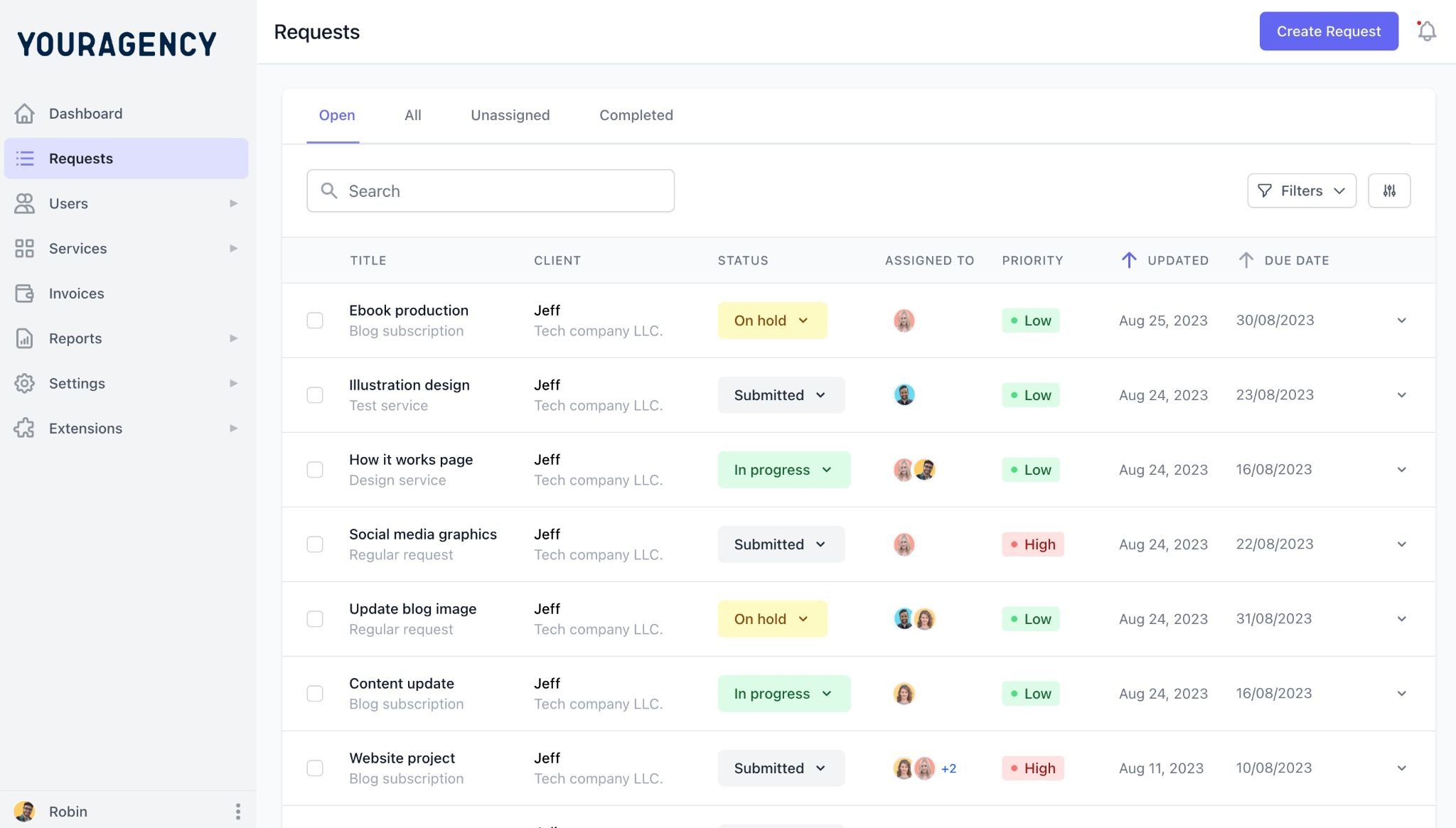
Every completed request sits in one place, so the deliverables list writes itself.
- Agency commentary. One paragraph from the account lead giving the month a narrative. What was the story? What decision affected the results? What is the agency watching next?
- Goals for next month. A table matching the goals-from-last-month format. Proposed by the agency, confirmed at the check-in, and carried forward into next month's report.
To fill in this template, you will need:
- GA4 or equivalent (cross-channel traffic and conversion data)
- Google Search Console (organic search and SEO performance)
- Social media native analytics for each active platform
- Your email platform reports (Klaviyo, Mailchimp, HubSpot, or similar)
- Your paid ads platform reports (Google Ads, Meta Ads Manager, LinkedIn Campaign Manager)
- Your project notes on deliverables completed during the period
- Any agreed goals documented from last month's report
Tips and Best Practices in Creating a Monthly Report
A multi-channel report is harder to write well than a single-channel one. Here are the practices that make it worth the effort:
- Write the cross-channel highlights section before filling in the individual channel data, not after. Start with the story of the month, then support it with numbers.
- Agree on one primary KPI per channel at onboarding and carry it through every report. That number should be visible at a glance. Everything else is supporting detail.
- Open every client check-in by reviewing last month's goals table together, not by presenting the report. Clients who already know the results ask better questions.
- Flag channel connections explicitly. If blog output is driving email list growth, say it. If SEO improvements are reducing paid dependency on branded keywords, make that visible. Clients who understand how their channels connect are harder to convince to cut individual ones.
- Keep each channel section to half a page or less. Ten well-organized pages a busy client can read in 15 minutes beats 30 pages nobody finishes.
- Send it three days before the check-in, not the morning of. Clients who have read the report skip the status update and go straight to strategy.
Mistakes to Avoid on Your Monthly Report
These are the mistakes that make strong multi-channel work look weaker than it is:
- Reporting each channel in isolation. Five-channel summaries with no cross-channel narrative are a bundled file, not a report. Drawing the connections between channels that the client cannot see themselves in is the agency's job.
- Leading every section with the best metric. Cherry-picking the strongest number from each channel makes the report look like a highlights reel. Clients notice when a report never has bad news.
- Letting the goals section disappear after month one. Agencies that fill it in for the first two months and quietly drop it are signaling they would rather not be held to what they agreed. Clients notice the omission even if they do not raise it.
- Switching metrics between months. If email was reported by open rate in January and click rate in February, because the click rate looked better, the client has no consistent baseline. Lock the metrics in at onboarding and report them every month, regardless of which direction they moved.
- No deliverables section. Multi-channel retainers involve a lot of invisible work. If the report only covers metrics, the client sees the output but not the effort. The deliverables section makes the full scope visible.
- Write the executive summary first. Write it last, after every channel section is complete. An executive summary written before the data is filled in is a guess. Clients can tell the difference.
How to Use Our Free Digital Marketing Monthly Report Template
- Download the template.
- Customize the cover with your agency name, logo, and client details.
- Fill in the highlighted sections with data from each channel platform.
- Review the full report before sending, making sure the narrative sections connect the channel data into one coherent story.
- Save the customized version as your standard monthly template and reuse it across every client on your roster.
Conclusion
Thank you for reading this far. If your current process is five separate reports going to the same client every month, this template fixes that.
The agencies holding multi-year retainers are not always the most talented ones in the room. They are the ones whose clients never have to wonder what is happening across their channels.
Scale that to 10 or 15 clients, and the manual process stops working.
ManyRequests replaces the duct-taped stack with one backend for client onboarding, request tracking, file delivery, and reporting, so every client's work lives in one place, and nothing gets sent to the wrong person. Try it free for 14 days.

.svg)