Free App Development Scope of Work Template [Docs / DOCX]
In your career, you've probably worked with clients who approved your proposal, paid you, and you started work. Everything seemed fine, until they reached out to ask whether the app has offline functionality.
You had assumed it's a cloud-only app. And with this new tweak, you'll spend an extra 3 weeks on development and database architecture changes that weren't included in the initial pricing.
You cannot push back on their request because you don't have an app development scope of work, so you decided to do it and pay your team out of pocket. You probably didn't productize the service as well, so you can't use the structure to avoid scope creep, like many ManyRequests users do.
With a well-written agreement, you can avoid this, or at least get them to pay for features that weren't stated initially.
In this guide, I'll briefly explain what the scope of work is and how to create yours.
What an App Development Scope of Work Covers
A scope of work describes the development process from the moment you gather requirements to the launch of version 1.0.
It includes provisions for the features you'll build into the app, the revision cycles, and what happens after the app goes live (whether you'll be part of the team or would be hired on an hourly basis when they need you).
Your scope of work also gives insights into questions such as:
- Are you building native apps or cross-platform?
- How many rounds of QA testing are included?
- What's covered under "bug fixes" versus "new features"?
- Who handles App Store submissions and app updates after launch?
Without this document, every feature request will involve back-and-forth over whether it was "implied" in the original agreement.
Why App Developers Need This Document
1. To avoid feature scope creep
It's typical for clients to want more features when you've already started building. If you're a contractor, you need to know this.
But you also need to protect yourself from overwhelming work when the founders want to add every feature that a small circle of their friends say would make the app better.
To do this, you need to specify what you're building, the features it'll have, and how many more features you can add during the testing period. You can also use ManyRequests’ Add-on service for upsells, which they'll pay for.
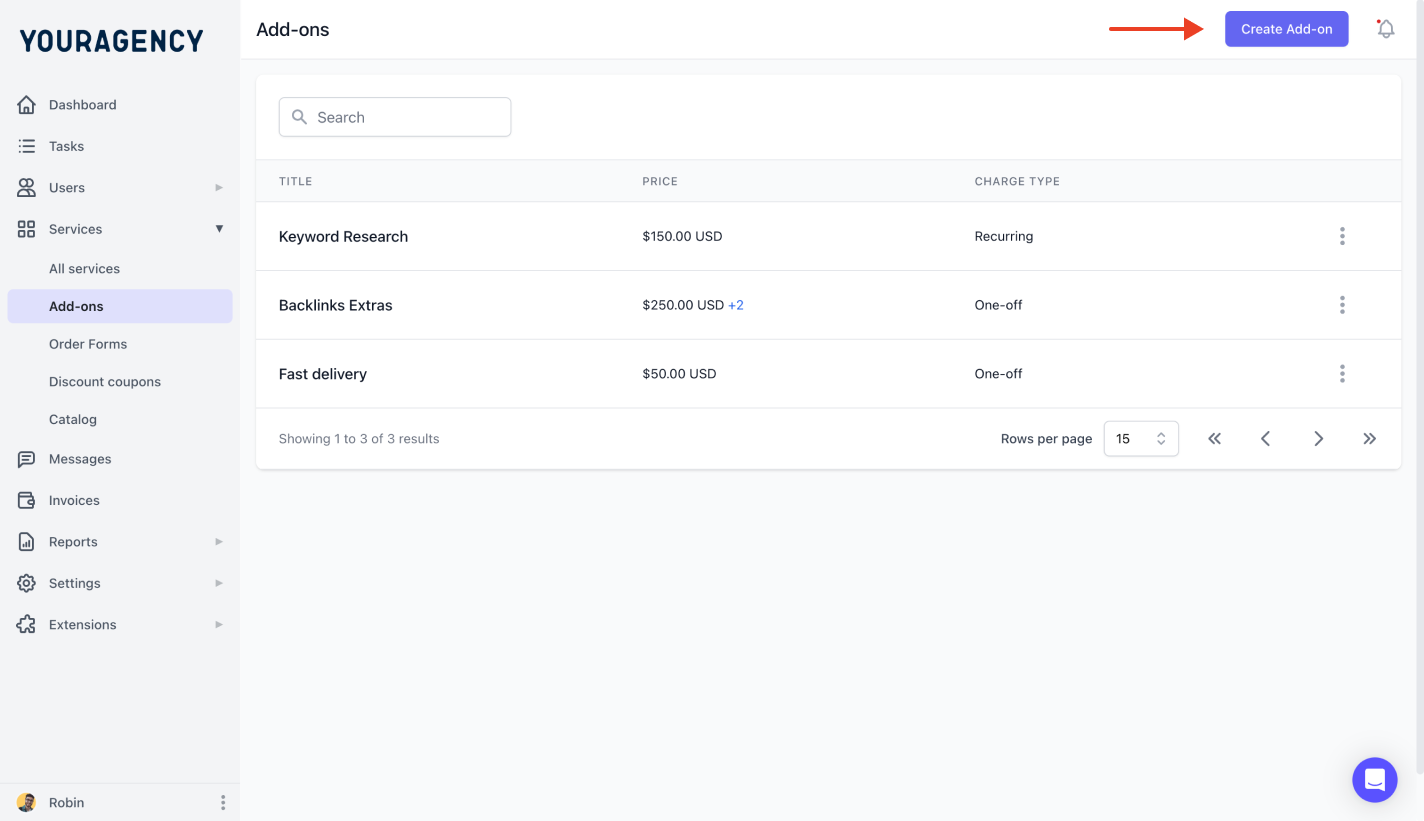
This way, you won't pay out of pocket for that new design they want. They'll add it as an upsell to their current work, and they'll be billed for it separately.
Learn more about ManyRequests.
2. Platform coverage
You can quote $10,000 for iOS development (which includes the fee to register for an iOS developer account, fast-track the D.U.N.S registration process, pay for servers, and ensure all other resources are up and running.
But when the client accepts, they may assume Android is also included because "it's basically the same app." It's not— they don't know that.
Your app development scope of work is a way to educate them on the difference between the two operating systems, so they understand why the same product has different development processes and bills.
Your scope clarifies the platform coverage upfront: "Development includes iOS app for iPhone and iPad (iOS 15+). Android development requires separate engagement. But we can provide cross-platform optimization and factor the pricing together."
3. Code ownership and infrastructure responsibilities
The app launches and performs well, and now the client needs an in-house team.
In an app development scope of work, you would specify whether you would provide the code and whether you would help them manage server infrastructure and other ongoing needs.
You can factor this in from the start of the project to align expectations. If they're not sure yet, add a clause stating that this contract ends immediately upon launch, but there's an opportunity to extend it if the client needs help after launch.
If you don't already have a productized service in ManyRequests, you can create a custom one for them so they can choose it. You'd manage all other work on the client portal (where they can sync directly with you and your team without email or slack). This makes work faster, easier to complete,
Creating Your App Development Scope of Work
1. Project overview and app description
Define what the app does and who uses it. Tagging it as “Mobile app" tells you nothing about the complexity of the build, user roles, or technical requirements you'd need to sort later.
Write a clear description: "Fitness tracking app for iOS allowing users to log workouts, track progress over time, and view workout history. Target audience: individual fitness enthusiasts ages 25-45. Single user role (no admin/coach features)."
Specify the problem it solves and the core value proposition.
This keeps everyone aligned on the app's purpose when feature requests arise. If someone suggests adding social features to a personal fitness tracker, you reference the original goal to show that it's out of scope, and they may need to pay extra.
2. Platform and technical specifications
List which platforms and OS versions you'll support.
Platform Coverage:
- iOS app (iPhone and iPad, iOS 15.0 and above).
- Android app (phones and tablets, Android 10 and above).
- Or: Cross-platform development using React Native/Flutter.
Technical Stack:
- Frontend: Swift/SwiftUI (iOS), Kotlin (Android), or React Native.
- Backend: Node.js API with PostgreSQL database.
- Hosting: AWS/Google Cloud/Azure.
- Third-party services: Firebase Authentication, Stripe payments, SendGrid email.
This documented detail can help the client understand everything you want to do as you start the project.
3. Features and functionality
Break features into clear categories with specific descriptions.
User Authentication:
- Email/password signup and login.
- Password reset via email.
- Basic profile creation (name, photo, preferences).
- NOT included: Social login (Google, Apple, Facebook), two-factor authentication, biometric login.
Core Features:
- Workout logging with exercise name, sets, reps, weight
- Workout history view (list and calendar views)
- Progress tracking with charts showing weight progression
- Exercise library with 50 pre-loaded exercises
- NOT included: Custom exercise creation, workout templates, social sharing, progress photos, exercise videos
Settings and Preferences:
- Unit preferences (lbs/kg, metric/imperial)
- Notification preferences
- Account management (change email, delete account)
Also, list what is NOT included for each feature category. This prevents clients from assuming "workout tracking" includes progress photos, social features, and coaching tools when you only quote for basic logging.
4. User flows and screen count
Document major user flows and approximate screen count.
Primary User Flows:
- Onboarding: Splash → Welcome → Signup → Profile Setup → Home (5 screens)
- Workout Logging: Home → New Workout → Exercise Selection → Set Entry → Save (4 screens)
- History: Home → History List → Workout Detail → Exercise Detail (3 screens)
Estimated Screen Count: 15-20 unique screens, including variations and states.
Screen count directly affects timeline and cost. A 10-screen app takes less time than a 20-screen app. Document this upfront so clients understand why adding "just a few more screens" impacts pricing.
5. Design and user interface
Specify who handles design and what's included. For example:
Option A - Developer Provides Design: Client receives wireframes and high-fidelity mockups before the dev begins. Two rounds of revisions, and, lastly, the design will follow platform guidelines (iOS Human Interface Guidelines and Material Design for Android).
Option B - Client Provides Design: Client provides complete designs in Figma/Sketch, including all screens, states, and design specifications. The developer will implement the designs as provided. Any change during the development phase will be billed hourly at $150/hour.
Design Deliverables (if developer creates):
- User flow diagrams
- Low-fidelity wireframes for approval
- High-fidelity mockups (all screens and major states)
- Design system documentation (colors, typography, components).
This keeps everything neat.
6. Development phases and timeline
Break the project into clear phases with deliverables. This can look like this:
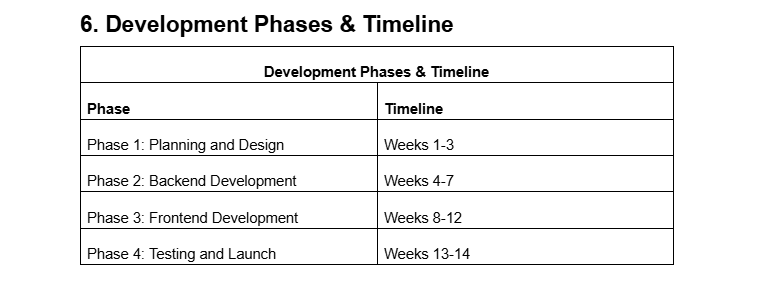
However, specify details of what these phases will be about.
7. Testing and quality assurance
Define testing scope and device coverage. This means you can specify that your testing will include things like:
- Functionality testing of all features.
- Testing on 3 iOS devices (iPhone 12, iPhone 14 Pro, iPad).
- Testing on 3 Android devices (Samsung Galaxy, Google Pixel, budget device).
- Basic performance testing.
- App Store submission testing.
You should also specify what's not included in the scope of tests you'll lead. These can be:
- Automated testing suite development.
- Security penetration testing.
- Load testing for high-traffic scenarios.
- Testing on every device model.
- Accessibility compliance testing (WCAG 2.1).
List how many rounds of bug fixes are included.
Typically: unlimited bug fixes during the development phase, one round of fixes after client QA testing, and additional fixes for critical bugs within 30 days of launch.
8. App store submission and launch
Clarify who handles submission and what's included. For example, will the developer register the accounts (and pay), or is it for the client?
9. Source code and intellectual property
Document code ownership and licensing.
Upon Final Payment, Client Receives:
- Complete mobile app source code.
- Build documentation.
- API endpoint documentation.
- Design files (if the developer created designs).
Developer Retains:
- Reusable code libraries and frameworks were developed for this project.
- Right to use non-client-specific code in future projects.
- Backend infrastructure unless separately purchased.
Third-Party Code: App includes open-source libraries with their respective licenses (MIT, Apache 2.0). Clients must maintain compliance with these licenses.
Other clauses you should have include:
10. Post-launch support and maintenance
11. Payment structure
Write the total cost and payment milestones. Total development cost is $xyz.
Payment Schedule:
- 25% deposit (starts planning phase).
- 25% after design approval (starts backend development).
- 25% after the frontend is completed (starts testing phase).
- 25% upon App Store approval and launch.
Change Orders: new features, scope, or additional platform request during the development process require separate change orders with revised timeline and pricing. Change orders must be approved in writing before work begins.
Payment Terms: Payments are due within 5 business days of invoice. The developer will pause work if the payment is more than 7 days late. Final source code delivery is also contingent on receipt of the final payment.
How to Use and Customize the App Development Scope of Work Template
Download the template and follow these steps:
- Add your development company branding (logo, contact information, portfolio link).
- Fill in project details (client name, app name, target platforms, estimated timeline, delivery date).
- Select the relevant features from the template and remove those that don't apply. If you're only building iOS, delete Android sections. If there's no backend API, remove infrastructure sections.
- Customize technical specifications. Replace placeholder tech stack (React Native, Node.js, PostgreSQL) with your actual development stack.
- Adjust timelines based on your team's velocity. If your design phase takes 4 weeks instead of 3, update it accordingly.
- Set phase milestones and payment schedule based on project size. Smaller apps might use a 30/40/30 payment structure instead of four equal payments.
- Review with your development team before sending. Make sure everyone understands deliverables, timeline, and technical requirements.
Conclusion
An app development scope of work prevents feature creep and establishes clear boundaries between initial development and ongoing maintenance.
You can use this template to specify platforms, features, testing coverage, and post-launch support, then reference it when clients request additions mid-project. This keeps everyone in check, so you won't have any challenges while developing.
ManyRequests helps development agencies manage client requests, track project progress, log development hours, and automate invoicing in one platform. Try it free for 14 days to see how it streamlines agency operations.
.svg)