Video
Proposals

Free Video Production Scope of Work Template [Docs / DOCX]

Adetola Rachael Iyanuoluwa

Last updated: Feb 23, 2026

Key Takeaways

  • A video production scope of work template prevents scope creep and protects billable hours.
  • Clearly define services, deliverables, technical specs, and out of scope items.
  • Set revision limits and approval timelines to avoid unpaid extra work.
  • Align timelines, feedback channels, and point of contact before production starts.
  • Tie scope, revisions, and billing together to improve profitability and scalability.

Free Video Production Scope of Work Template

At some point, you've had clients who want more than you agreed to when you started working together. Perhaps they asked for just one more scene in the final cut or a quick B-roll addition to make the video more engaging (not that it wasn't already engaging). 

A video production scope of work helps you avoid this.

What is a Video Production Scope of Work?

A video production scope of work is a foundational document that specifies exactly what video assets you'll deliver and when you'll deliver them.

It describes what's included in your engagement (pre-production meetings, shooting days, editing rounds, color grading, sound design, etc.) and what's not. It also provides context on:

  • deadlines (when is the rough cut due, when is the final delivery?),
  • the point of contact (who reviews the cuts, approves final versions, and pays the invoice?), and
  • What success looks like through specific deliverables and technical specs.

Most video production projects involve multiple stakeholders and technical requirements that may change during production. A scope of work adapts to these changes and protects you (and your team) from working outside the agreed scope.

Other Reasons Why You Need a Video Production Scope of Work Template

A typical video production scope of work protects you in three ways that generic project documents don't:

1. Scope Creep

It's typical for clients to make other requests during a shoot day. These small requests often mean your editor works extra hours and you probably won't be paid for them.

There are acts of good faith, and there is business. And sometimes, the lines are blurred by small, unpaid work that can eat up your team's billable hours.

But with a scope of work, you can show your pricing structure for each service (and also specify the cost for additional deliverables). 

You can use the ManyRequests service catalog to frontline all your services and the pricing structure for them. This way, your clients (or prospects) can see what each service (or add-on) will cost them before committing to your agency.

You can also customize the billing to be per project, per shoot day, or any other custom period you'd prefer.

Note: While designing your services (and pricing structure), always include specific rounds of revisions. For example, "Two rounds of revisions after rough cut delivery" or "Three color grading adjustments per project."

Any request beyond that attracts extra fees, so you can avoid overworking your team on unpaid, endless revisions.

2. Manage Client Expectations Across Production Phases

A video production scope of work also helps you clarify expectations. 

Instead of vague outcomes, you can specify the services you'll deliver, the deadlines, technical deliverables, and what is excluded from the services you'll render.

For example, it can be as straightforward as: 

"I will shoot a 3-minute brand video with two camera angles and deliver the final cut. I will not provide raw footage unless purchased separately and will not create additional social media versions without an add-on."

When clients understand exactly what you'll do and won't do, and when they'll see the finished video, they're less likely to request services that are not part of the scope.

They can add more services to it, though. For example, ManyRequests has a feature for "add-ons" where clients can request extra services outside the initial scope of work. 
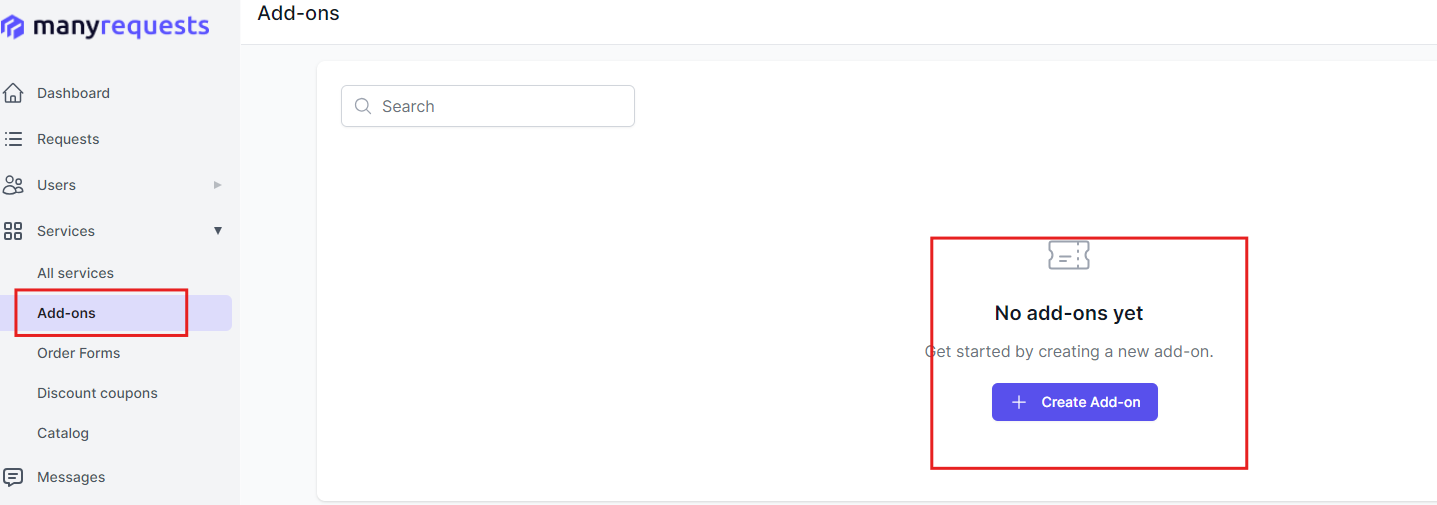
They'll be billed for this separately, but it lets you make room for extra work.

3. Improve Communication While Managing Productions

Sometimes, you get a retainer client who has a consistent demand for video content. They may need regular services for brand videos, social media content, testimonial interviews, and product demos.

Whatever the workload is, this video production scope of work establishes communication protocols on:

  • What the exact jobs to be done are: Specific tasks for each production phase (script review, shoot day logistics, editing, revisions).
  • When it will be done: Shoot dates, rough cut delivery, final delivery deadlines.
  • Who needs to approve the work: Who approves the creative direction, who signs off on rough cuts, and who gives final approval.
  • Medium to receive feedback: Is it through a client portal like ManyRequests, email threads with timestamps, or video review tools?
  • What counts as a completed project: When does production end, what are the final deliverables (file formats, resolutions, versions), and what defines "approved final cut"?

These protocols keep everyone aligned. Your clients know when to review cuts, and your team knows when to expect feedback.

Creating Your Video Production Scope of Work

This is a six-step process (but you can use our template to get started right away):

1. List of Services and Tasks

Write every service you'll provide, and be specific about what each service entails. For example:

Pre-Production Services:

  • Creative consultation call (1 hour)
  • Script review and revision (2 rounds of feedback)
  • Shot list creation and approval
  • Location scouting (up to 3 locations)
  • Talent coordination and booking

Production Services:

  • 2 full shoot days (8 hours each)
  • 2-camera setup with lighting and audio
  • On-set direction
  • B-roll capture (up to 30 shots)

Post-Production Services:

  • Video editing (one 3-minute final cut)
  • Color grading
  • Sound design and music licensing
  • Two rounds of revisions after rough cut
  • Final delivery in 3 formats (1080p, 4K, social media vertical)

List what you won't do under each service. For production, specify that you won't provide raw footage (or if you do, state the additional cost). If you're not hired for animation or motion graphics, state it so you're aligned on expectations. You can also do this in section 4.

2. Project Timeline and Milestones

Show when each deliverable is due and when clients should expect results. For example, based on your agency's structure/workflow, this could look like:

  • Week 1: Kickoff call, creative brief finalized, script approval
  • Week 2: Pre-production complete (shot list, talent booked, locations confirmed)
  • Week 3: Shoot days completed
  • Week 4-5: Editing begins, rough cut delivered by end of week 5
  • Week 6: Client feedback incorporated, second revision delivered
  • Week 7: Final cut approved and delivered in all agreed formats

For projects with longer timelines or multiple videos, write clear expectations to keep everyone on track.

3. Deliverables and Technical Specs

List exactly what clients receive and the technical specifications for each deliverable.

Deliverables:

  • One 3-minute brand video (rough cut for review, then final approved version)
  • Three export formats: 4K (3840x2160), 1080p (1920x1080), vertical social (1080x1920)
  • Licensed music tracks (usage rights included)
  • Project file (Premiere Pro or Final Cut Pro) if purchased separately

Technical Specs:

  • Frame rate: 24fps for cinematic look, 30fps for web content
  • Codec: H.264 for web delivery, ProRes for archival
  • Audio: Stereo mix, normalized to -14 LUFS
  • Color: Rec. 709 color space for web
  • File delivery: Via Google Drive or WeTransfer

4. Out of Scope Items

These are tasks/activities that you won't render.

For example, this project does NOT include:

  • Animation or motion graphics
  • Drone footage
  • Additional shoot days beyond the two specified
  • Voice-over recording (talent and studio booking)
  • Captions or subtitles (can be added as a separate service)
  • Social media posting or distribution
  • Raw footage delivery (available as an add-on for $500)
  • Additional versions beyond the three specified formats

When clients ask for these services, refer to this section and discuss additional fees or a separate project agreement.

5. Revision Policy

You need some flexibility for revisions, so specify:

Revision Limits:

  • Rough cut: 2 rounds of revisions included
  • Color grading: 1 round of adjustments after initial grade
  • Sound mix: 1 round of adjustments
  • Additional revisions: $200 per round after included revisions are exhausted

Whatever works for you.

Revision Timeline. Have a provision for this as well, so it can look like:

  • Client provides consolidated feedback within 5 business days after each delivery
  • Revisions will be completed within 5 business days of receiving feedback
  • Feedback must come from one designated point of contact to avoid conflicting notes
  • Requests beyond revision limits will require a new agreement and additional fees

6. Approval and Point of Contact

Define who approves what and how feedback is submitted. (Check the template for more information.)

Point of Contact:

  • All project requests and feedback are submitted through email, Slack, or project management tools. 
  • For shoot day coordination: Direct phone contact with the  production manager.
  • For creative feedback: Consolidated notes via portal with timestamps.
  • Response time: 24 hours for standard requests, same-day for shoot-day urgent issues.
  • Review calls: Scheduled after rough cut delivery and before final delivery.

How to Use and Customize the Video Production Scope of Work Template

First, download the template and follow these steps:

  • Add your agency branding (logo, colors, contact information, reel link).
  • Fill in client details (company name, project title, shoot dates, delivery date).
  • Select relevant services from the template and delete what doesn't apply. If you're only handling post-production, remove the sections on pre-production and shoot days.
  • Customize service specifics. For example, replace the numbers (2 shoot days, 3-minute video) with your actual deliverables.
  • Adjust timelines based on your agency's workflow. If you need 10 business days for the rough cut instead of 7, update it.
  • Set your technical specs based on client needs and delivery platforms.
  • Review with your production team before sending it off. Make sure everyone understands what you've committed to deliver.

Conclusion

A video production scope of work protects your agency from scope creep and helps you manage client expectations. You can use this template to specify the services you'll offer and when, and always refer to it throughout the project to prevent scope creep.

And if you want to further improve your agency's structure, use ManyRequests to access features like client portal, project management, time-tracking, and automated invoicing in one platform. This way, you can manage scope creep, deliver work, and get paid without integrating another accounting software. Give it a shot for 14 days, free of charge.

Template Features

11-page guided document (with examples)
ManyRequests is a client portal and client requests management software for creative services.
Get Your Free Template

Continue Reading

Agency Management

Cost Performance Index Formula Explained for Creative Agencies [2026]

Learn the cost performance index formula (CPI) and how creative agencies use it to boost profits and avoid budget surprises. 📊
Read more
Agency Marketing

Mastering KPI Reports for Creative Teams in 2026

Master KPI reports in your agency. Track client results, team output, and profitability without spreadsheets.
Read more
Tools & Comparisons

4 Best WorkflowMax Alternatives for Creative Agencies in 2026

Looking for WorkflowMax alternatives? Here are 4 better tools for agencies handling design, billing, and client work 🎨
Read more
Agency Management

Client Information Management: The Modern Creative Agency Playbook [2026]

Upgrade your client information management. Learn how agencies keep files, invoices, and communication in sync for growth and happy clients.
Read more
Agency Management

What Is a Gantt Chart? Modern Project Management for Creative Teams (2026 Guide)

Want to know what is a Gantt chart? This guide explains Gantt charts for creative teams - plus tips, visuals, and agency workflows!
Read more
Agency Management

Customer Loyalty for Creative Agencies: Reduce Churn Now [2026]

Boost customer loyalty at your agency with proven strategies to reduce churn, retain clients, and grow your creative business. 🚀
Read more

Switch in days, not weeks.

14-day free trial
No card required
Free Full Migration Support
Live Chat & Email Guidance